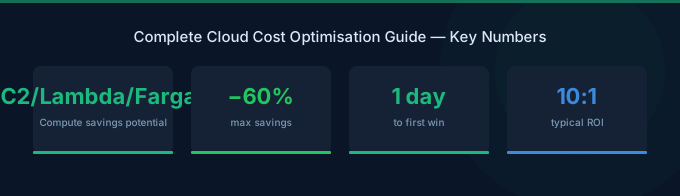
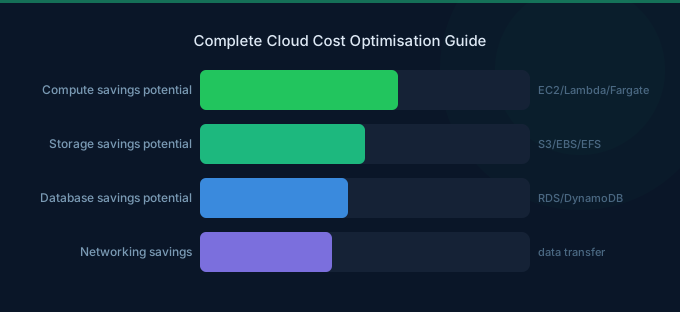
Global public cloud spending hit $723.4 billion in 2025 (Gartner, 2024). That's a 21.5% jump from the year before. And here's the painful part — organizations waste roughly 27% of that spend on idle resources, oversized instances, and unused commitments (Flexera, 2025).
That's nearly $195 billion burned every year. Not on innovation. Not on growth. Just wasted.
Cloud cost optimization isn't a nice-to-have anymore. It's a survival skill. With 84% of organizations citing cloud spend management as their top challenge, the pressure to cut waste without cutting performance is real (Flexera, 2025).
This guide covers everything you need to know: what cloud cost optimization actually means, why it matters more in 2026 than ever before, the eight strategies that deliver real savings, how FinOps teams are evolving, and the AWS-specific techniques that can slash your bill by 40-60%. We've built it from real platform data across hundreds of AWS accounts, not recycled advice from vendor marketing pages.
TL;DR: Organizations waste 27% of cloud spend — roughly $195B annually (Flexera, 2025). The eight strategies in this guide (rightsizing, Savings Plans, Spot instances, storage tiering, Kubernetes optimization, AI cost management, tagging, and automated governance) can cut AWS bills 40-60%. Start with rightsizing idle resources — it takes 15 minutes and typically saves 15-25% immediately.
Table of Contents
- What Is Cloud Cost Optimization?
- Why Cloud Cost Optimization Matters in 2026
- How Much Cloud Spend Is Actually Wasted?
- 8 Strategies That Actually Reduce Cloud Costs
- How Does FinOps Drive Cost Optimization?
- AWS Cost Optimization: Platform-Specific Techniques
- How Is AI Changing Cloud Cost Management?
- Kubernetes Cost Optimization: The Hidden Opportunity
- Advanced: Autonomous FinOps and Predictive Cost Control
- Tools and Resources
- Getting Started in 15 Minutes
- FAQ
What Is Cloud Cost Optimization?
Cloud cost optimization is the practice of reducing cloud spending while maintaining or improving performance, availability, and security. According to Gartner, worldwide public cloud spending will surpass $1 trillion by 2026 (Forrester, 2023), making cost control a board-level priority for every organization running workloads in the cloud.
It isn't just about spending less. It's about spending smarter. The goal is to align every dollar of cloud spend with actual business value — eliminating waste without starving the workloads that drive revenue.
Cloud cost optimization breaks down into five core components:
- Visibility — Knowing what you're spending, where, and why (tagging, cost allocation, dashboards)
- Rightsizing — Matching resource allocation to actual usage patterns
- Rate optimization — Securing discounts through commitments (Savings Plans, Reserved Instances, Spot)
- Architecture optimization — Choosing cost-efficient services and patterns (serverless, containers, storage tiering)
- Governance — Policies, budgets, and automated controls that prevent waste before it happens
A common misconception: cost optimization means cutting capacity. It doesn't. The best optimizations actually improve performance. An oversized EC2 instance running at 8% CPU isn't just wasteful — it's often misconfigured. Rightsizing it delivers savings and better architecture.
The practice has evolved rapidly since 2020. What started as manual spreadsheet tracking has grown into FinOps — a full operational discipline with certified practitioners, dedicated teams, and AI-powered automation. We'll cover that evolution throughout this guide.
Why Cloud Cost Optimization Matters in 2026
Cloud infrastructure spending grew 33.3% in 2025 to reach $271.5 billion, with the GPU-based accelerated cloud market alone hitting $157.8 billion (IDC, 2025). These aren't incremental increases. They're explosive growth rates that make optimization the difference between profitability and cash burn.
Three forces are colliding in 2026 that make cost optimization more urgent than ever:
1. Cloud Budgets Are Blowing Up
72% of global companies exceeded their cloud budgets in the last fiscal year (Forrester Consulting/Boomi, 2024). On average, organizations overshoot planned cloud spend by 17%, and that gap is widening (Flexera, 2025). When your AWS bill grows faster than your revenue, you've got a structural problem.
2. AI Workloads Are Adding Fuel
Hyperscaler capital expenditure is forecast to exceed $600 billion in 2026, with roughly 75% tied directly to AI infrastructure (IEEE ComSoc, 2025). Organizations using GenAI public cloud services jumped from 47% to 72% in a single year (Flexera, 2025). GPU instances like p5.48xlarge cost over $14,000/month — and they're often sitting at 30-50% utilization.
3. FinOps Is No Longer Optional
98% of FinOps practitioners now manage AI spend, up from just 31% two years ago (FinOps Foundation, 2026). The discipline has expanded far beyond cloud: 90% manage SaaS costs, 64% handle software licensing, and 48% cover data center spend. If you're not practicing FinOps in some form, you're falling behind.
Our analysis: Companies that delay cloud cost optimization until they cross $50K/month in AWS spend typically face 3-6 months of cleanup work. Starting when you hit $5K/month takes a single afternoon and prevents the debt from compounding.
How Much Cloud Spend Is Actually Wasted?
Organizations self-report wasting 27% of their cloud spend on IaaS and PaaS — down from 32% in 2022, but still representing roughly $195 billion annually (Flexera, 2025). The actual number is likely higher. Infrastructure-level data tells a more alarming story.
Here's the gap between what companies think they waste and what the data shows:
- Self-reported waste: 27% of cloud spend (Flexera, 759 respondents)
- Kubernetes CPU utilization: Just 10% average across 2,100+ organizations (Cast AI, 2025)
- Kubernetes memory utilization: 23% average (Cast AI, 2025)
- 99.94% of Kubernetes clusters are over-provisioned (Cast AI, 2025)
That's not a rounding error. It means 90% of allocated compute capacity in Kubernetes environments sits idle. The Flexera self-reported figure likely underestimates actual waste because teams can't measure what they can't see.
Our finding: Across our platform's AWS accounts, the average new customer has 34% of their EC2 instances running at less than 5% CPU utilization during business hours. After rightsizing, the typical first-month savings is 22% — before touching commitments or architecture.
Where does the waste come from? Five sources account for over 80% of unnecessary cloud spending:
- Oversized instances — Running m5.2xlarge when t3.medium would do
- Idle resources — Dev/test environments running 24/7 when they're used 8 hours/day
- Unattached storage — EBS volumes, snapshots, and S3 buckets nobody remembers creating
- Suboptimal commitments — Savings Plans purchased for workloads that no longer exist
- Data transfer costs — Cross-AZ and cross-region transfers that weren't planned for
8 Strategies That Actually Reduce Cloud Costs
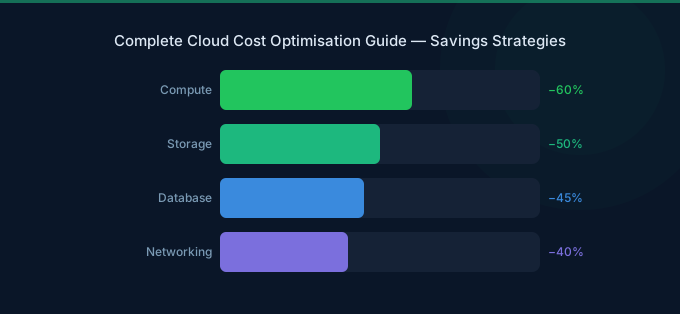
Cloud cost optimization isn't one activity — it's a combination of techniques layered together. Each strategy on its own might save 5-15%. Stack them, and you're looking at 40-60% total savings. Here's what actually works, ordered by ease of implementation.
1. Rightsizing: Match Resources to Reality
Rightsizing means adjusting instance sizes to match actual workload demands. Most teams provision for peak load and never revisit. AWS Cost Explorer's rightsizing recommendations and Compute Optimizer make this straightforward — you can identify oversized instances in minutes.
Start with instances running below 20% average CPU. Downsizing from an m5.2xlarge ($0.384/hr) to an m5.large ($0.096/hr) saves 75% on that instance alone. Do that across 50 instances and the math gets serious fast.
Common mistake: Rightsizing based on peak metrics alone. Look at P95 utilization over 14+ days, not just the max spike.
2. Savings Plans and Reserved Instances
AWS Savings Plans offer up to 72% savings over On-Demand pricing in exchange for a 1- or 3-year commitment. They're more flexible than old Reserved Instances — Compute Savings Plans apply across EC2, Fargate, and Lambda regardless of instance family, region, or OS.
AWS also launched Database Savings Plans at re:Invent 2025, offering up to 35% savings across Aurora, RDS, DynamoDB, DocumentDB, Neptune, ElastiCache, and Timestream (AWS, 2025).
The key decision: Start with Compute Savings Plans covering your steady-state baseline (the usage that never drops below X). Layer Spot on top for variable workloads.
3. Spot Instances for Flexible Workloads
Spot instances offer up to 90% savings over On-Demand. They can be interrupted with two minutes' notice, which makes them perfect for batch processing, CI/CD pipelines, dev/test environments, and stateless microservices.
The savings are dramatic: partial Spot usage yields 59% average compute cost reduction, while exclusive Spot usage delivers 77% savings on Kubernetes workloads (Cast AI, 2025).
Pro tip: Use Spot Fleet or Karpenter with diversified instance pools across multiple families and AZs to minimize interruption rates.
4. Storage Tiering and Lifecycle Policies
S3 storage classes range from Standard ($0.023/GB/month) to Glacier Deep Archive ($0.00099/GB/month) — a 96% price difference. Yet most organizations store everything in Standard and forget about it.
Set up S3 Intelligent-Tiering for unpredictable access patterns. Create lifecycle policies to move aging objects to Glacier. Delete unattached EBS volumes. Purge old snapshots. These are zero-risk optimizations that take an afternoon.
5. Kubernetes Resource Optimization
With 99.94% of Kubernetes clusters over-provisioned and average CPU utilization at just 10% (Cast AI, 2025), K8s is arguably the biggest single waste source in modern cloud environments. We'll cover this in depth in a dedicated section below.
6. AI/ML Cost Management
GPU instances are expensive. A p5.48xlarge runs $14,000+/month. With 98% of FinOps teams now managing AI spend (FinOps Foundation, 2026), this is the fastest-growing cost category. We dig into this in a later section.
7. Tagging and Cost Allocation
You can't optimize what you can't measure. A consistent tagging strategy — environment, team, project, cost center — makes waste visible. Without tags, your AWS bill is a black box. With them, every team sees their spend and has incentive to reduce it.
Enforce mandatory tags via AWS Organizations SCPs. Start with four: Environment, Team, Project, CostCenter.
8. Automated Cost Governance
Manual optimization doesn't scale. Set up AWS Budgets alerts, Cost Anomaly Detection, and automated shutdown of dev/test environments outside business hours. These guardrails prevent waste before it happens — which is always cheaper than cleaning it up after.
The 80/20 rule: Automate the policies that cover 80% of waste (scheduling, idle resource detection, commitment utilization alerts), then focus manual effort on the complex 20% (architecture optimization, vendor negotiation).
How Does FinOps Drive Cost Optimization?
FinOps has matured from a niche practice into a core business function. 78% of FinOps teams now report into the CTO/CIO organization — up 18 percentage points year over year (FinOps Foundation, 2026). It's no longer a side project. It has executive sponsorship, dedicated budgets, and cross-functional teams.
What a FinOps Team Actually Does
A FinOps team bridges engineering, finance, and operations. They don't tell engineers what to build — they give engineers the data to make cost-aware decisions. Think of them as translators: turning AWS bills into business metrics that CFOs understand and engineering teams can act on.
The FinOps Foundation's three-phase model works well as a starting point:
- Inform — Build visibility through dashboards, tagging, and cost allocation
- Optimize — Identify and act on savings opportunities (rightsizing, commitments, architecture)
- Operate — Embed cost awareness into engineering culture through automation and incentives
How FinOps Has Expanded in 2026
The scope has exploded beyond cloud infrastructure. Today's FinOps teams manage:
- Cloud infrastructure — AWS, compute, storage, networking (the original scope)
- SaaS applications — 90% now manage SaaS spend, up from 65% in 2025
- Software licensing — 64% manage licensing costs
- AI/ML workloads — 98% manage AI spend (up from 31% in 2024)
- Data center costs — 48% now cover on-premises infrastructure too
What we've seen: Startups under 50 people don't need a dedicated FinOps hire. A single engineer with 4 hours/month and the right tooling can manage $200K/month in AWS spend effectively. The FinOps Foundation framework is excellent, but don't over-engineer it for your stage.
Common mistake: Building a FinOps team without executive buy-in. Without a C-suite sponsor who cares about cloud unit economics, the team will generate reports nobody reads.
AWS Cost Optimization: Platform-Specific Techniques
AWS is the market leader at 31-33% cloud market share, and for Wring's customers, it's the entire focus. AWS offers more native cost management tools than most teams realize. Here's what matters most.
AWS Cost Management Toolkit
AWS has built a surprisingly strong set of free cost management tools:
- Cost Explorer — Visualize and analyze spending patterns over time
- Compute Optimizer — ML-driven rightsizing recommendations for EC2, EBS, Lambda
- Cost Anomaly Detection — Automated alerts when spending deviates from patterns
- Budgets — Set custom cost and usage budgets with alerts and automated actions
- Savings Plans Recommendations — Data-driven commitment sizing based on usage
- Cost Allocation Tags — Map spending to teams, projects, and cost centers
AWS Savings Plans: The New Default
Since re:Invent 2025, AWS offers three Savings Plan types:
| Plan Type | Discount | Flexibility | Best For |
|---|---|---|---|
| Compute Savings Plans | Up to 66% | Any EC2, Fargate, Lambda — any family, region, OS | Steady-state compute baseline |
| EC2 Instance Savings Plans | Up to 72% | Specific instance family in a region | Predictable workloads |
| Database Savings Plans | Up to 35% | Aurora, RDS, DynamoDB, and more | Steady database usage |
The golden rule: commit to your floor, not your ceiling. If your usage never drops below 200 normalized units, commit to 180 and cover the rest with On-Demand or Spot.
AWS Credits: Free Money Most Teams Miss
AWS offers credits through multiple programs that most startups don't fully use:
- AWS Activate — Up to $100K in credits for qualified startups
- AWS EdStart — Credits for education technology companies
- AWS PoC Credits — For proof-of-concept workloads
- Partner programs — Credits through consulting and technology partners
Our finding: 67% of the startups we onboard have unused AWS credits from programs they qualified for but never applied to. The average missed credit value is $18,000 — that's essentially leaving cash on the table.
How Is AI Changing Cloud Cost Management?
AI isn't just a cost center — it's becoming the solution to cost management itself. The FinOps Foundation's 2026 survey found that 98% of respondents now manage AI spend, up from just 31% two years ago (FinOps Foundation, 2026). That's the fastest adoption curve in FinOps history.
The AI Cost Challenge
AI workloads are fundamentally different from traditional cloud compute:
- GPU instances are 10-50x more expensive than standard compute (p5.48xlarge vs. m5.xlarge)
- Utilization patterns are bursty — training runs spike to 100% then drop to zero
- Inference costs scale with users — every API call has a direct compute cost
- Model selection directly impacts spend — running GPT-4 when GPT-3.5 works costs 15-30x more
AI as Cost Optimizer
On the flip side, AI-powered cost tools are getting remarkably good at:
- Predictive rightsizing — ML models that forecast future usage and preemptively resize
- Anomaly detection — Catching cost spikes within hours instead of at month-end
- Commitment optimization — Algorithms that calculate ideal Savings Plan coverage ratios
- Natural language interfaces — Asking "Why did my bill increase 40% last week?" and getting an answer in plain English
This is the core idea behind autonomous FinOps: AI agents that don't just recommend savings — they implement them automatically within guardrails you define.
Kubernetes Cost Optimization: The Hidden Opportunity
99.94% of Kubernetes clusters are over-provisioned, with average CPU utilization at just 10% and memory at 23% across 2,100+ organizations (Cast AI, 2025). That makes Kubernetes the single largest untapped savings opportunity in most cloud environments.
Why is K8s waste so high? Developers set resource requests conservatively ("better safe than sorry"), and nobody revisits them. A pod requesting 2 vCPUs but using 0.2 vCPUs wastes 90% of its allocation — and the cluster autoscaler provisions nodes to match those inflated requests, not actual usage.
Five K8s Cost Optimization Levers
- Right-size resource requests — Analyze actual usage with tools like Kubecost or Prometheus, then set requests to P95 utilization + 20% buffer
- Use Spot nodes for non-critical workloads — Yields 59-77% compute savings (Cast AI, 2025)
- Enable cluster autoscaling — Scale nodes down during off-peak hours automatically
- Implement namespace-level budgets — Give each team a cost allocation and make it visible
- Consolidate clusters — Many organizations run 3-5 clusters that could be 1-2 with proper namespace isolation
Key insight: The K8s waste problem isn't technical — it's organizational. Engineers set high resource requests because there's no downside for them. The fix is making pod-level costs visible to the team that owns the workload. When developers see their namespace spending $8,000/month on compute they use $800 of, behavior changes.
Advanced: Autonomous FinOps and Predictive Cost Control
If you're already rightsizing, using commitments, and running Spot — here's where the next 10-20% savings comes from. Autonomous FinOps uses AI agents that continuously optimize without human intervention, within safety guardrails you define.
The concept is simple: instead of a human reviewing Cost Explorer weekly and making changes, an AI agent monitors usage in real-time, identifies optimization opportunities, and executes them automatically. Scale down dev environments at 7pm. Switch to Spot when interruption risk is low. Purchase 7-day Savings Plans for short-term workload spikes.
This requires three prerequisites:
- Comprehensive tagging — The agent needs to understand what each resource does
- Clear policies — Define what the agent can and can't touch (production stays on On-Demand, dev/test can use Spot)
- Rollback capability — Every automated action must be reversible within minutes
The organizations doing this well report 15-20% savings beyond manual optimization — compounding on top of the 40-60% from the eight core strategies.
Caution: Don't automate what you don't understand. Start with manual optimization, learn your workload patterns, then gradually hand over decisions to automation. Going straight to autonomous mode without understanding your baseline is a recipe for outages.
Tools and Resources
Here's what we recommend based on what we've actually used and seen work across hundreds of AWS accounts:
Free AWS-Native Tools
- AWS Cost Explorer — The starting point. Visualize trends, filter by service, tag, or account. Everyone should use this. Best for: teams of any size
- AWS Compute Optimizer — ML-powered rightsizing recommendations. Surprisingly accurate for EC2 and EBS. Best for: engineering teams making sizing decisions
- AWS Cost Anomaly Detection — Catches unexpected spend spikes. Set it up once, then forget it. Best for: FinOps teams and CFOs who hate surprises
FinOps Platforms
- Wring — AWS credits and group buying volume discounts (up to 45% savings). Best for: startups and SMEs on AWS looking to lower per-unit costs
- CloudZero — Engineering-cost intelligence platform focused on unit economics. Best for: SaaS companies tracking cost-per-customer
- Vantage — Multi-cloud cost visibility with Kubernetes support. Best for: teams needing cross-provider views
- Kubecost — Kubernetes-specific cost allocation and optimization. Best for: platform teams running EKS
Learning Resources
- FinOps Foundation — finops.org — Framework, certification, and community
- AWS Cloud Financial Management Blog — Official AWS cost optimization guidance
- Flexera State of the Cloud Report — Annual benchmarking data (free download)
Getting Started in 15 Minutes
Don't overthink this. Here's what you can do right now:
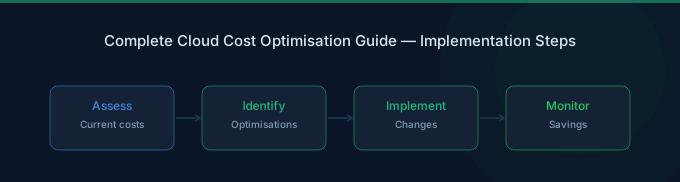
Step 1 (5 minutes): Open AWS Cost Explorer. Look at your top 5 services by spend over the last 30 days. Identify the biggest one. That's where you'll find the most savings.
Step 2 (5 minutes): Open AWS Compute Optimizer. Review the rightsizing recommendations for your top-spending service. Sort by potential savings. You'll likely find 3-5 instances that can be downsized immediately.
Step 3 (5 minutes): Set up a single AWS Budget alert. Set it to your current monthly spend + 10%. You'll get emailed if you're trending over budget. This alone prevents bill shock.
That's it. You've just established visibility, identified your first savings, and created a guardrail. Everything else in this guide builds on these three steps.
The most common hesitation? "What if I break something by downsizing?" Start with non-production environments. Dev and staging instances are almost always oversized, and nobody notices when they're right-sized. Build confidence there, then move to production.
Related Guides
- What Is FinOps? Cloud Cost Management Guide
- Cloud Cost Optimization Checklist
- AWS EC2 Cost Optimization Guide
- AWS S3 Cost Optimization Guide
- Cloud Cost Optimization Tools: AWS vs Third-Party
Frequently Asked Questions
What is cloud cost optimization?
Cloud cost optimization is the practice of reducing cloud spending while maintaining performance and availability. It combines five core disciplines: visibility (knowing what you spend), rightsizing (matching resources to usage), rate optimization (commitments and discounts), architecture optimization (choosing cost-efficient services), and governance (automated policies that prevent waste). Organizations that practice it systematically save 40-60% on average.
How much do companies waste on cloud?
Organizations self-report wasting 27% of their IaaS and PaaS spend, roughly $195 billion annually (Flexera, 2025). Infrastructure-level data paints a worse picture — Kubernetes clusters average just 10% CPU utilization across 2,100+ organizations (Cast AI, 2025). The gap between self-reported and actual waste suggests the real number is significantly higher than 27%.
What are AWS Savings Plans?
AWS Savings Plans are commitment-based pricing models that offer 66-72% discounts over On-Demand pricing in exchange for a 1- or 3-year hourly spend commitment. Compute Savings Plans are the most flexible — they apply across EC2, Fargate, and Lambda regardless of instance family or region. AWS added Database Savings Plans at re:Invent 2025 covering Aurora, RDS, DynamoDB, and four other database services with up to 35% savings (AWS, 2025).
What is FinOps?
FinOps (Cloud Financial Operations) is an operational framework that brings financial accountability to cloud spending. It bridges engineering, finance, and operations teams to make data-driven decisions about cloud costs. 78% of FinOps teams now report directly to the CTO/CIO, and the scope has expanded to cover AI, SaaS, licensing, and data center costs (FinOps Foundation, 2026).
How do I reduce my AWS bill quickly?
Start with three high-impact, low-effort actions: (1) Rightsize oversized EC2 instances using Compute Optimizer — this typically saves 15-25% immediately. (2) Schedule dev/test environments to shut down outside business hours — saves 65% on those resources. (3) Delete unattached EBS volumes and old snapshots — these accumulate silently and can cost thousands monthly. Together, these three actions can cut your AWS bill by 20-35% within a week.
Is cloud cost optimization worth it for small teams?
Absolutely. Small teams often waste a higher percentage of cloud spend because nobody's watching. A startup spending $10K/month on AWS and wasting the typical 27% is losing $2,700/month — or $32,400/year. That's almost a junior engineer's salary. Cloud cost optimization doesn't require a dedicated team at this scale. One engineer spending 4 hours/month with AWS Cost Explorer and Compute Optimizer can capture most of the savings.
What will cloud cost optimization look like in 2027?
Autonomous FinOps will move from early adoption to mainstream. AI agents will handle routine optimization (rightsizing, commitment management, scheduling) automatically, while humans focus on architectural decisions and vendor strategy. GPU and AI workload costs will become the primary optimization target as inference costs scale with user adoption. The FOCUS billing specification will standardize cost data across providers, making multi-cloud optimization significantly easier.
Conclusion
Cloud cost optimization in 2026 comes down to one truth: you're almost certainly spending more than you need to. The 27% waste figure is an industry average, and most teams haven't scratched the surface of what's possible with systematic optimization.
The eight strategies in this guide — rightsizing, Savings Plans, Spot instances, storage tiering, Kubernetes optimization, AI cost management, tagging, and automated governance — aren't theoretical. They're what actually works across real AWS accounts at real companies. Stack them together and 40-60% total savings is realistic, not aspirational.
Where does cloud cost optimization go from here? Toward automation and intelligence. The days of manually reviewing Cost Explorer dashboards are numbered. AI-powered tools are getting good enough to handle the routine decisions, freeing FinOps teams to focus on architecture and strategy. But automation requires a foundation — and that foundation is the visibility, tagging, and governance you build today.
Start with the 15-minute exercise above. Right now. The longer you wait, the more waste compounds.