Data transfer is the cost that surprises everyone. You budget for EC2 instances, RDS databases, and S3 storage — then the bill shows a $2,000 line item for "data transfer out" that nobody expected. A t3.large that costs $61/month in compute can generate $450 in data transfer if it serves 5TB of content to the internet.
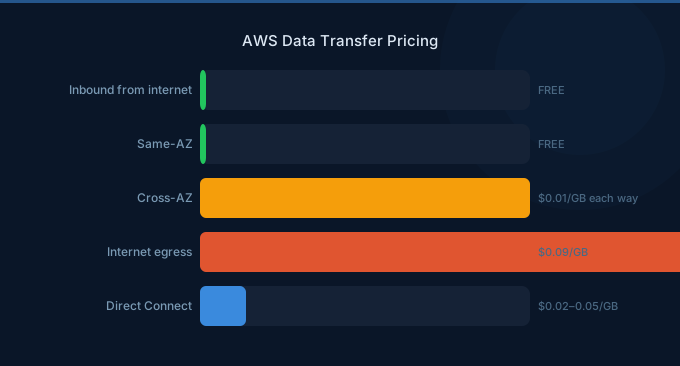
AWS charges for data leaving its network. Data coming in is free. Data moving between services in the same AZ is mostly free. Everything else costs money — and the pricing varies by direction, distance, and volume.
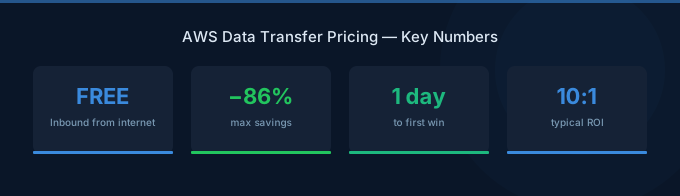
TL;DR: Data transfer IN is always free. The first 100GB OUT per month is free. Beyond that, outbound internet transfer costs $0.09/GB (up to 10TB). Cross-AZ traffic costs $0.01/GB each way. Cross-region costs $0.02/GB. The cheapest trick: route traffic through CloudFront — S3-to-CloudFront is free, and CloudFront egress is cheaper than direct.
The Complete Data Transfer Pricing Map
Outbound to Internet (Egress)
| Monthly Volume | Price/GB |
|---|---|
| First 100 GB | Free |
| Up to 10 TB | $0.09 |
| Next 40 TB | $0.085 |
| Next 100 TB | $0.07 |
| Over 150 TB | $0.05 |
Internal AWS Traffic
| Route | Price/GB | Notes |
|---|---|---|
| Same AZ, same service | Free | EC2→EC2 via private IP |
| Same AZ, different service | Free | EC2→RDS in same AZ |
| Cross-AZ (same region) | $0.01 each direction | $0.02 round-trip |
| Cross-region | $0.02 | One direction |
| S3 → CloudFront | Free | The best loophole |
| S3 → Same-region services | Free | EC2, Lambda, etc. |
Data Transfer IN
| Source | Price |
|---|---|
| Internet → AWS | Always free |
| Direct Connect IN | Free |
| Any source → S3 (same region) | Free |
Why Data Transfer Costs Surprise You
Most pricing calculators show compute and storage costs. Data transfer is calculated separately and often ignored. Here's how it compounds:
| Scenario | Compute Cost | Transfer Cost | Transfer as % of Total |
|---|---|---|---|
| API serving 1TB/month | $70 (m6i.large) | $81 | 54% |
| SaaS app, 5TB/month | $70 (m6i.large) | $441 | 86% |
| Media streaming, 50TB/month | $140 (m6i.xlarge) | $4,285 | 97% |
| Multi-AZ microservices, 10TB cross-AZ | $350 (5 instances) | $200 | 36% |
For content-heavy applications, data transfer often exceeds compute costs by 5-10x.
What we see at Wring: Data transfer costs account for 10-25% of total AWS bills for the average customer, but for media, gaming, and SaaS companies, it can reach 40-60%. It's the line item most teams don't track — and the one with the most optimization potential.
Cross-AZ Traffic: Death by a Thousand Cuts
Cross-AZ data transfer costs $0.01/GB in each direction — $0.02 round-trip. That sounds cheap until you realize how much inter-service traffic microservices generate.
The Microservices Multiplier
A typical microservices architecture with 5 services in different AZs:
| Service Call | Payload | Calls/Day | Monthly GB | Monthly Cost |
|---|---|---|---|---|
| API → Auth service | 2KB | 500K | 30 GB | $0.60 |
| API → User service | 5KB | 300K | 45 GB | $0.90 |
| API → Product service | 10KB | 200K | 60 GB | $1.20 |
| API → Order service | 8KB | 100K | 24 GB | $0.48 |
| API → Notification | 3KB | 400K | 36 GB | $0.72 |
| Total | 195 GB | $3.90 |
$3.90/month seems trivial. But scale to 10x traffic (5M API calls/day) and it's $39/month. Scale to enterprise (50M calls/day) and it's $390/month — just for cross-AZ chatter between your own services.
How to Reduce Cross-AZ Costs
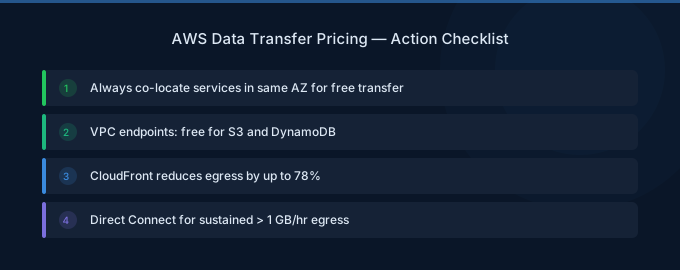
- Co-locate in the same AZ — If two services always communicate, put them in the same AZ. You lose multi-AZ resilience for that pair but save on transfer.
- Use AZ-aware routing — Configure your load balancer to prefer same-AZ targets. ALB supports this natively.
- Batch API calls — Instead of 10 small requests, send 1 batched request. Same data, 1/10th the request overhead.
- Use VPC endpoints — S3 and DynamoDB Gateway Endpoints are free and keep traffic off the public network.
The CloudFront Strategy: Free Transfer from S3
The single biggest data transfer optimization is routing S3 content through CloudFront:
- S3 direct to internet: $0.09/GB (after 100GB free)
- S3 to CloudFront: Free
- CloudFront to internet: $0.085/GB (plus 1TB/month free)
For a website serving 10TB/month from S3:
| Method | Cost |
|---|---|
| Direct from S3 | 100GB free + 9,900GB × $0.09 = $891 |
| Via CloudFront | 1TB free + 9TB × $0.085 = $765 |
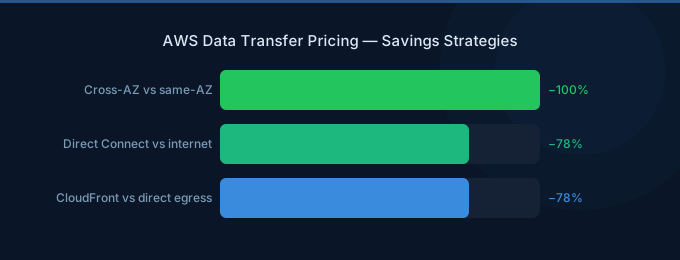
| Savings | $126/month (14%) |
Plus CloudFront delivers faster (CDN caching at edge locations) and reduces S3 request costs since CloudFront caches responses.
For smaller volumes (under 10TB), the savings are even more dramatic because of CloudFront's 1TB free tier:
| Volume | Direct S3 | Via CloudFront | Savings |
|---|---|---|---|
| 500 GB | $36 | Free (under 1TB) | 100% |
| 1 TB | $81 | Free | 100% |
| 2 TB | $171 | $85 | 50% |
| 5 TB | $441 | $340 | 23% |
NAT Gateway: The Silent Drainer
NAT Gateway is one of the most expensive networking components on AWS. It lets private subnet resources access the internet:
| Component | Price |
|---|---|
| NAT Gateway per hour | $0.045 (~$32.40/month) |
| Data processing | $0.045/GB |
That $0.045/GB processing fee adds up fast. A NAT Gateway processing 1TB/month costs $45 in processing alone — plus the $32 hourly charge = $77/month for one NAT Gateway.
Most companies run 2-3 NAT Gateways (one per AZ). At 1TB/month each, that's $231/month just for NAT.
NAT Gateway Alternatives
- VPC Endpoints (Gateway): Free for S3 and DynamoDB. Route traffic directly without NAT.
- VPC Endpoints (Interface): $0.01/hr + $0.01/GB. Cheaper than NAT for specific services.
- NAT Instance: Run a t3.nano as a NAT instance ($3.80/month). Less reliable but 95% cheaper for low-volume traffic.
The S3 VPC Endpoint quick win: Adding a free S3 Gateway Endpoint to your VPC immediately removes all S3 traffic from your NAT Gateway. If your applications download data from S3 through NAT (common in containerized apps pulling config/assets), this single change can cut NAT processing costs by 30-70%.
Direct Connect vs. Internet Transfer
For companies moving large volumes of data regularly, AWS Direct Connect provides dedicated network connections:
| Connection | Port Fee/Month | Data Transfer/GB |
|---|---|---|
| Internet (egress) | — | $0.09 |
| Direct Connect (1Gbps) | $0.30/hr (~$219/mo) | $0.02 |
| Direct Connect (10Gbps) | $2.25/hr (~$1,642/mo) | $0.02 |
The break-even point: at roughly 5TB/month of egress, Direct Connect 1Gbps becomes cheaper than internet transfer. At 10TB+, the savings are substantial.
| Monthly Volume | Internet Cost | Direct Connect Cost | Savings |
|---|---|---|---|
| 5 TB | $441 | $219 + $100 = $319 | $122 (28%) |
| 20 TB | $1,700 | $219 + $400 = $619 | $1,081 (64%) |
| 100 TB | $7,000 | $219 + $2,000 = $2,219 | $4,781 (68%) |
Related Guides
- AWS Data Transfer Cost Optimization Guide
- AWS NAT Gateway Pricing Guide
- AWS CloudFront Pricing: CDN Costs and Savings
- AWS EC2 Pricing: Every Model and Discount
Frequently Asked Questions
Is data transfer into AWS free?
Yes, always. All data transfer into AWS from the internet is free, regardless of volume. Data transfer into S3, EC2, RDS, and all other services from the internet costs $0. This applies globally across all regions.
How much does cross-region data transfer cost?
$0.02/GB for data transfer between AWS regions. This applies to all services — EC2, S3, RDS replication, etc. Cross-region replication for S3 costs $0.02/GB for the transfer plus the destination storage costs. There's no free tier for cross-region traffic.
What's the cheapest way to transfer large amounts of data out of AWS?
For regular egress over 5TB/month, AWS Direct Connect at $0.02/GB is the cheapest option. For one-time large transfers, AWS Snowball ($300 per device, 80TB capacity) costs effectively $0.00375/GB — the cheapest per-GB rate available. For smaller volumes, CloudFront's 1TB free tier is the easiest win.
Does data transfer between EC2 and S3 cost money?
In the same region, no — EC2 to S3 and S3 to EC2 transfers are free. Cross-region transfers cost $0.02/GB. Always keep your compute and storage in the same region. Add an S3 Gateway Endpoint to your VPC to ensure traffic stays on the AWS network.
How do I track my data transfer costs?
Enable AWS Cost Explorer and filter by "Data Transfer" usage type. Enable VPC Flow Logs to see traffic patterns between services. Use AWS Cost and Usage Report for granular per-service, per-AZ transfer breakdown. Tag your resources so you can attribute transfer costs to specific teams or applications.
Stop Leaking Money on Data Transfer
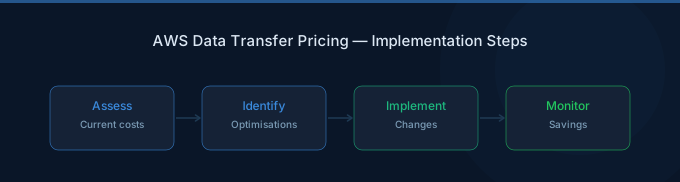
Data transfer is the most under-optimized cost on AWS. Most teams don't even know how much they spend on it. Here's your action plan:
- Check Cost Explorer — Filter by "Data Transfer" to see your current spend
- Add S3 Gateway Endpoint — Free, 5-minute setup, immediate NAT savings
- Put CloudFront in front of S3 — Free S3→CloudFront + 1TB free egress
- Audit NAT Gateways — Check processing volume, consider VPC endpoints
- Co-locate services — Same-AZ is free, cross-AZ costs $0.02 round-trip