EC2 typically represents 35-50% of a company's total AWS bill (GoCloud, 2026). That makes it the single biggest line item you'll ever optimize — and the most confusing. With over 5 million distinct EC2 configurations across 36 regions and 114 Availability Zones (nOps, 2025), getting pricing right isn't trivial.
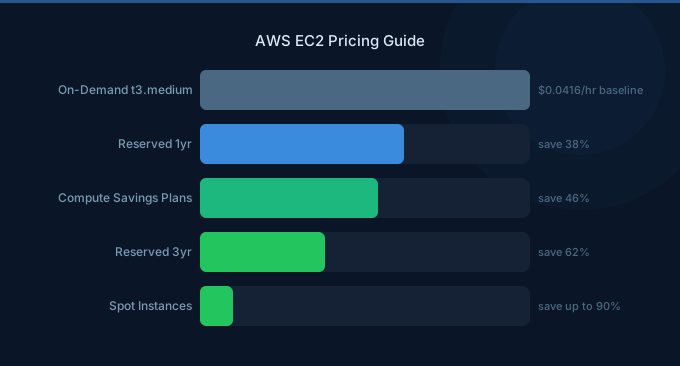
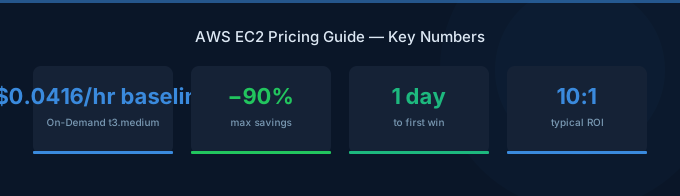
A t3.micro costs $0.0104/hour. A p5.48xlarge costs $98.32/hour. That's a 9,450x price range within the same service. And the discount options — On-Demand, Spot, Reserved Instances, Savings Plans — can cut your bill by up to 90%, but only if you pick the right one.
TL;DR: A t3.micro costs ~$7.59/month On-Demand. Spot Instances save up to 90% but can be interrupted. Savings Plans save up to 72% with a 1-3 year commitment. 64% of AWS organizations now use commitment discounts, up from 45% in 2023 (ProsperOps, 2025). Start with On-Demand, identify steady-state usage after 2-3 months, then commit.
The Four EC2 Pricing Models
Every EC2 instance can be purchased through four pricing models. The instance itself is identical — same hardware, same performance, same features. Only the billing changes.
| Model | Max Discount | Commitment | Flexibility | Best For |
|---|---|---|---|---|
| On-Demand | 0% | None | Maximum | Unpredictable workloads, testing |
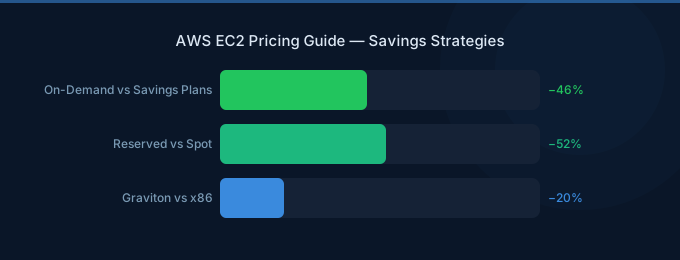
| Spot | Up to 90% | None (can be reclaimed) | Interruption risk | Batch jobs, CI/CD, stateless apps |
| Savings Plans | Up to 72% | 1 or 3 years | Moderate | Steady-state production workloads |
| Reserved Instances | Up to 72% | 1 or 3 years | Lowest | Predictable, long-term workloads |
On-Demand Pricing: What You Actually Pay
On-Demand is the default. See the EC2 pricing page for current rates. No commitment, per-second billing (minimum 60 seconds for Linux), and you can start or stop instances at any time. It's also the most expensive option — every other pricing model is a discount off On-Demand.
Here are the most commonly used instance types and their On-Demand prices (US East - N. Virginia):
| Instance | Family | vCPUs | RAM | $/Hour | ~$/Month |
|---|---|---|---|---|---|
| t3.micro | Burstable | 2 | 1 GiB | $0.0104 | $7.59 |
| t3.medium | Burstable | 2 | 4 GiB | $0.0416 | $30.37 |
| m6i.large | General Purpose | 2 | 8 GiB | $0.0960 | $70.08 |
| m6i.xlarge | General Purpose | 4 | 16 GiB | $0.1920 | $140.16 |
| c6i.xlarge | Compute Opt. | 4 | 8 GiB | $0.1700 | $124.10 |
| r6i.large | Memory Opt. | 2 | 16 GiB | $0.1260 | $91.98 |
| g4dn.xlarge | GPU (NVIDIA T4) | 4 | 16 GiB | $0.5260 | $383.98 |
| p5.48xlarge | GPU (H100) | 192 | 2,048 GiB | $98.32 | $71,773.60 |
The hidden multiplier: That $70/month m6i.large? Add 200GB of EBS storage ($16), 5TB data transfer ($450), 3 idle Elastic IPs ($10.80), and a load balancer ($75). Your "~$70 instance" just became $612/month — a 10x surprise. Always calculate the total cost, not just the instance price.
Instance Family Cheat Sheet
Not sure which instance type to pick? Here's the decision tree:
| Workload | Recommended Family | Why |
|---|---|---|
| Web servers, small apps | t3/t4g (burstable) | Cheapest. Good for variable CPU usage. |
| Steady-state apps, APIs | m6i/m7i (general purpose) | Balanced compute/memory. The safe default. |
| CPU-heavy (rendering, encoding) | c6i/c7i (compute optimized) | Higher CPU-to-memory ratio. |
| Databases, caching | r6i/r7i (memory optimized) | Higher memory-to-CPU ratio. |
| ML training | p5 (GPU - H100) | Most powerful, most expensive. |
| ML inference | g4dn/g5 (GPU - T4/A10G) | Good GPU at lower cost than p5. |
| ARM workloads | t4g/m7g/c7g (Graviton) | 20% cheaper than Intel equivalents. |
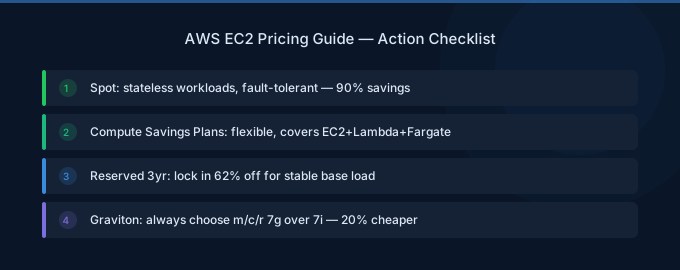
The Graviton advantage: AWS Graviton (ARM) instances are 20% cheaper than Intel equivalents with comparable or better performance for most workloads. Switching from m6i.large ($0.096/hr) to m7g.large ($0.0816/hr) saves $10/month per instance with zero code changes for most applications. We've seen customers save 15-25% on their EC2 bill just by migrating to Graviton.
Spot Instances: Up to 90% Savings
Spot Instances let you use spare EC2 capacity at massive discounts — up to 90% off On-Demand pricing (AWS, 2025). The catch: AWS can reclaim your instance with a 2-minute warning when demand for that capacity increases.
Real-world blended Spot savings average 59-77% across Kubernetes workloads (CAST AI, 2025 Kubernetes Cost Benchmark). The historical interruption rate is typically less than 5%, meaning 95% of Spot requests run to completion.
When to Use Spot
Spot works brilliantly for:
- Batch processing — ETL jobs, data pipelines, video encoding
- CI/CD — Build and test runners (if a build gets interrupted, just restart it)
- Stateless web servers behind a load balancer (traffic routes to surviving instances)
- Big data — Spark/EMR clusters where data persists in S3
- Machine learning training with checkpointing enabled
Spot does NOT work for:
- Databases — data corruption on interruption
- Single-instance applications — no failover available
- Long-running stateful processes that can't checkpoint
Spot Pricing Examples
| Instance | On-Demand | Spot (typical) | Savings |
|---|---|---|---|
| m6i.large | $0.096/hr | ~$0.029/hr | ~70% |
| c6i.xlarge | $0.170/hr | ~$0.051/hr | ~70% |
| r6i.large | $0.126/hr | ~$0.038/hr | ~70% |
| g4dn.xlarge | $0.526/hr | ~$0.158/hr | ~70% |
Spot pricing fluctuates with demand. Check real-time prices in the EC2 Spot Pricing console.
Spot Best Practices
- Diversify instance types — Request multiple instance families (m6i, m5, m7i) so AWS has more capacity pools to draw from
- Use Spot Fleet or Auto Scaling — Let AWS pick the cheapest available option from your list
- Enable checkpointing — Save state periodically so interrupted jobs can resume
- Set a max price — Never pay more than On-Demand by setting a ceiling price
Savings Plans: Flexible Commitments
Savings Plans are AWS's newer commitment model, introduced to replace the rigidity of Reserved Instances. You commit to a consistent hourly spend (e.g., $10/hour of compute) for 1 or 3 years, and AWS gives you a discount.
64% of AWS organizations now use commitment discounts, up from 45% in 2023. Median compute coverage grew from 28% to 55% (ProsperOps, 2025).
Two Types of Savings Plans
| Type | Max Discount | Flexibility |
|---|---|---|
| Compute Savings Plans | Up to 66% | Any instance family, size, OS, region. Also covers Lambda and Fargate. |
| EC2 Instance Savings Plans | Up to 72% | Locked to one instance family in one region. Can change size within family. |
The trade-off: Compute Savings Plans are more flexible (change instance type, region, or even switch to Lambda/Fargate), but EC2 Instance Savings Plans save 6% more. For most companies, the flexibility of Compute Savings Plans is worth the slightly lower discount.
Payment Options
| Payment | Discount Level | Cash Flow |
|---|---|---|
| All Upfront | Highest (up to 72%) | Pay entire commitment upfront |
| Partial Upfront | Medium | 50% upfront, 50% monthly |
| No Upfront | Lowest (~40-50%) | Monthly payments only |
How to Size Your Savings Plan
- Open the AWS Cost Explorer Savings Plans recommendations
- Look at your past 30-60 days of hourly compute usage
- Find your baseline — the minimum hourly spend that's always running
- Commit to 80-90% of that baseline (leave headroom for variability)
- Let the remaining 10-20% run On-Demand or Spot
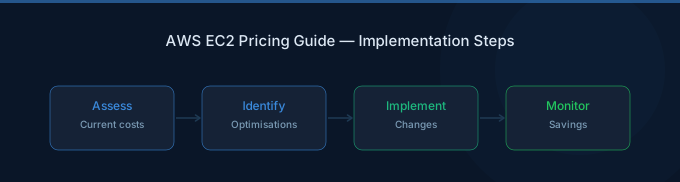
What we recommend: Don't commit 100% of your compute on day one. Start with 70% coverage via Savings Plans, run the rest On-Demand for 2-3 months, then gradually increase coverage as you understand your baseline. Over-committing is the #1 mistake — you're locked in for 1-3 years.
Reserved Instances: The Legacy Option
Reserved Instances (RIs) were the original commitment discount model. They still work and offer the same maximum discount (72%) as EC2 Instance Savings Plans, but they're less flexible.
| Type | Max Discount | Can Modify? |
|---|---|---|
| Standard RI | Up to 72% | Can change AZ and scope; can't change instance family |
| Convertible RI | Up to 66% | Can exchange for different instance types |
RIs vs. Savings Plans: Which to Use?
For new commitments, Savings Plans are almost always better. They offer the same discounts with more flexibility. The only scenario where RIs still make sense:
- You're running a specific instance type in a specific region and will never change
- You want to sell unused capacity on the RI Marketplace (Savings Plans can't be resold)
- Your organization already has RI management tooling in place
The True Cost of an EC2 Instance
The instance price is just the beginning. Here's what actually shows up on your bill:
| Component | Monthly Cost | Notes |
|---|---|---|
| EC2 t3.large instance | $60.74 | The price you see on the pricing page |
| 200GB EBS gp3 volume | ~$16.00 | $0.08/GB/month |
| 5TB data transfer out | ~$450.00 | $0.09/GB after first 100GB free |
| 3 idle Elastic IPs | ~$10.80 | $0.005/hr per unused EIP |
| Application Load Balancer | ~$75.00 | Fixed hourly + per LCU |
| Total | ~$612.54 | 10x the "instance price" |
The biggest surprise is usually data transfer. AWS charges $0.09/GB for outbound data after the first 100GB free. If your application serves images, videos, or large API responses, data transfer can dwarf the instance cost.
How to Reduce Hidden Costs
- EBS: Use gp3 instead of gp2 — it's cheaper and faster. Don't provision io2 volumes unless you need guaranteed IOPS above 16,000.
- Data transfer: Put CloudFront in front of your application. CloudFront's first 1TB/month is free, and beyond that it's cheaper than direct EC2 egress.
- Elastic IPs: Release any EIPs not attached to running instances. AWS charges $0.005/hour ($3.60/month) per idle EIP.
- Cross-AZ traffic: Each direction costs $0.01/GB. Minimize cross-AZ calls or co-locate services in the same AZ when HA isn't needed.
Instance Generation: Stop Paying for Old Hardware
83% of organizations still allocate an average of 17% of their EC2 budgets to previous-generation instance types (Datadog, 2024). That's money left on the table.
Newer generations are almost always cheaper AND faster:
| Upgrade Path | Price Change | Performance Change |
|---|---|---|
| m5.large → m6i.large | -5% | +15% |
| m6i.large → m7i.large | -3% | +15% |
| c5.xlarge → c6i.xlarge | -8% | +15% |
| Any Intel → Graviton (g suffix) | -20% | +0 to +20% |
Rule of thumb: If your instance type has a generation number below 6, you're overpaying. Upgrade to the latest generation — it's usually a drop-in replacement with no code changes.
GPU Instances: The AI Price Explosion
GPU instance spending grew 40% year-over-year, increasing from 10% to 14% of total EC2 compute costs. 74% of GPU adopters use the G4dn family — the cheapest GPU option (Datadog, 2024).
| Instance | GPU | VRAM | $/Hour | ~$/Month | Use Case |
|---|---|---|---|---|---|
| g4dn.xlarge | 1x T4 | 16GB | $0.526 | $384 | Inference, light training |
| g5.xlarge | 1x A10G | 24GB | $1.006 | $734 | Medium inference, fine-tuning |
| p4d.24xlarge | 8x A100 | 320GB | $32.77 | $23,922 | Large-scale training |
| p5.48xlarge | 8x H100 | 640GB | $98.32 | $71,774 | Frontier model training |
The serverless alternative: Before committing to GPU instances, consider Amazon Bedrock or SageMaker Inference. For inference workloads, paying per-token through Bedrock is often cheaper than running a dedicated GPU instance — especially at low-to-medium throughput. A g4dn.xlarge costs $384/month whether you use it or not. Bedrock charges you zero when idle.
Rightsizing: The Easiest Win
27% of cloud spend is wasted, down from 32% four years ago (Flexera, 2025). The single easiest way to reduce EC2 costs is rightsizing — matching your instance type to your actual resource usage.
How to Rightsize
- Enable AWS Compute Optimizer — it analyzes your instance CPU, memory, and network usage and recommends optimal instance types
- Check utilization — If your CPU averages below 20%, you're almost certainly oversized
- Downsize one step — Go from m6i.xlarge to m6i.large. Monitor for 1-2 weeks. If performance is fine, you just saved 50%
- Consider burstable — t3/t4g instances give you baseline CPU with burst capability. If your CPU only spikes occasionally, burstable is significantly cheaper than fixed instances
Rightsizing Before Committing
This is critical: rightsize FIRST, commit SECOND. If you buy a Savings Plan for oversized instances, you're locking in waste for 1-3 years. Spend 2-3 months rightsizing, then commit to your optimized baseline.
Related Guides
- AWS EC2 Cost Optimization: 12 Proven Strategies
- AWS Savings Plans vs Reserved Instances
- AWS Graviton vs Intel Cost Comparison
- AWS EBS Pricing: Volume Types and Hidden Costs
- AWS ELB Pricing Guide
Frequently Asked Questions
What's the cheapest EC2 instance?
The t3.nano at $0.0052/hour ($3.80/month) is the cheapest On-Demand instance. However, the t4g.nano (Graviton/ARM) is $0.0042/hour ($3.07/month) — 20% cheaper. For Spot pricing, the same instances can drop below $0.002/hour. Note that nano instances have only 0.5GB RAM and limited CPU credits, so they're only suitable for very light workloads.
How much does EC2 cost per month for a typical web application?
A small web application (1-2 servers + load balancer + database) typically costs $150-400/month On-Demand. Breakdown: 2x t3.medium ($60 total), 1x ALB ($25-75), 1x RDS db.t3.medium ($53), EBS storage ($20-40), and data transfer ($10-50). With Savings Plans covering the EC2 instances, you can bring this down to $100-280/month.
Should I use Savings Plans or Reserved Instances?
Savings Plans for almost everything. They offer the same discounts (up to 72% for EC2 Instance Savings Plans) with more flexibility. You can change instance sizes, families (with Compute SP), and even switch to Lambda/Fargate. RIs only make sense if you want to resell unused capacity on the RI Marketplace.
Is EC2 cheaper than running my own servers?
For variable workloads, yes — you pay only for what you use. For steady 24/7 workloads, the raw compute cost of EC2 is typically 2-3x more expensive than owning hardware. But when you factor in data center costs, staffing, maintenance, power, cooling, and the ability to scale up/down, EC2 is cheaper for most businesses under $1M/year in compute spend.
How do I monitor my EC2 costs?
Enable AWS Cost Explorer and set up billing alerts in CloudWatch. Tag every instance with environment (prod/staging/dev), team, and project. This lets you attribute costs and identify waste. AWS Compute Optimizer provides automated rightsizing recommendations based on actual utilization data.
Start Optimizing Your EC2 Bill
The average organization wastes 27% of cloud spend. For EC2 — your largest AWS line item — that waste adds up fast. Here's your optimization checklist:
- Rightsize immediately — Check Compute Optimizer; downsize anything under 20% CPU utilization
- Upgrade to latest generation — Move from m5/c5 to m7g/c7g (Graviton) for instant 20% savings
- Use Spot for batch and CI/CD — 70-90% savings on interruptible workloads
- Commit to Savings Plans — Cover your steady-state baseline with a 1-year No Upfront plan
- Kill hidden costs — Release idle EIPs, switch to gp3 volumes, put CloudFront in front of data transfer