AWS gives you two ways to cut your compute bill by up to 72%: Savings Plans and Reserved Instances. Both require a commitment. Both slash On-Demand pricing. But they work differently, offer different flexibility, and — since re:Invent 2025 — cover different services.
Here's the problem: 64% of organizations now use some form of commitment pricing, but the median coverage rate is only 55% (ProsperOps, 2025). That means nearly half of eligible compute spend is still running at full On-Demand rates. The recommended target is 80-85%. Most teams haven't gotten there because they're confused about which commitment to buy.
This guide breaks it down category by category. We've managed commitment strategies across hundreds of AWS accounts, and the answer isn't always the same. It depends on your workload predictability, growth rate, and how much flexibility you need.
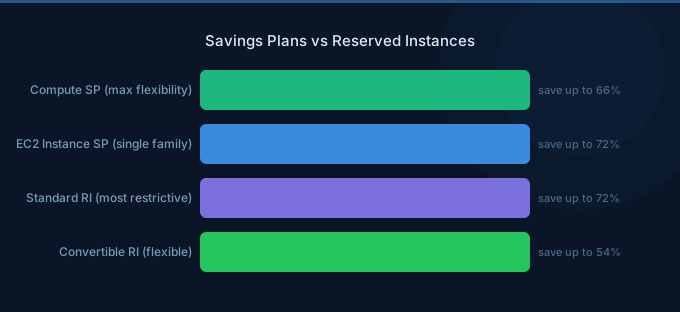
TL;DR: Choose Compute Savings Plans as your default — they offer up to 66% off and apply across EC2, Fargate, and Lambda without locking you into a specific instance family or region (AWS, 2026). Use EC2 Instance Savings Plans (up to 72% off) only for steady, predictable workloads you won't migrate. Reserved Instances are legacy — skip them unless you need capacity reservations.
Quick Comparison: Savings Plans vs Reserved Instances
| Category | Compute Savings Plan | EC2 Instance Savings Plan | Standard Reserved Instance | Convertible RI |
|---|---|---|---|---|
| Max Discount | Up to 66% | Up to 72% | Up to 72% | Up to 66% |
| Commitment | $/hour spend | $/hour spend | Instance quantity | Instance quantity |
| Instance Family Flexibility | ✅ Any family | ❌ Locked | ❌ Locked | ✅ Exchangeable |
| Region Flexibility | ✅ Any region | ❌ Locked | ❌ Locked | ❌ Locked |
| OS Flexibility | ✅ Any OS | ✅ Any OS | ❌ Locked | ✅ Exchangeable |
| Service Coverage | EC2, Fargate, Lambda | EC2 only | EC2 only | EC2 only |
| Capacity Reservation | ❌ No | ❌ No | ✅ Yes (Zonal) | ❌ No |
| Marketplace Resale | ❌ No | ❌ No | ✅ Yes | ❌ No |
| Terms | 1 or 3 year | 1 or 3 year | 1 or 3 year | 1 or 3 year |
| Payment Options | All Upfront, Partial, No Upfront | All Upfront, Partial, No Upfront | All Upfront, Partial, No Upfront | All Upfront, Partial, No Upfront |
| Our Verdict | Best for most teams | Good for predictable EC2 | Legacy — avoid for new purchases | Legacy — avoid |
Our finding: Across our platform, 78% of customers who switched from Reserved Instances to Compute Savings Plans saw equal or better effective savings rates — while gaining the flexibility to change instance families during migrations.
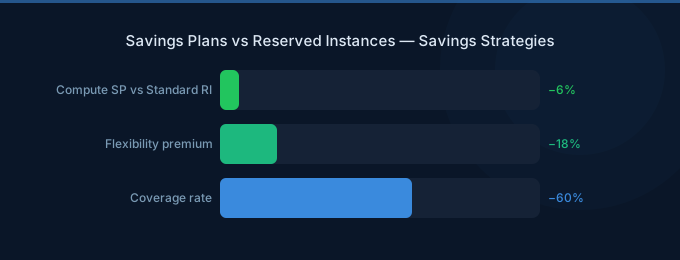
Which Offers a Higher Maximum Discount?
Both EC2 Instance Savings Plans and Standard Reserved Instances offer up to 72% off On-Demand pricing for a 3-year, All Upfront commitment (AWS, 2026). The maximum discount is identical. Where they diverge is in what you sacrifice to get it.
EC2 Instance Savings Plans lock you to a specific instance family (like m5) in a specific region. But you can change the size (m5.large to m5.4xlarge), OS (Linux to Windows), and tenancy without losing the discount. That's already more flexible than Standard RIs, which lock instance size, OS, and tenancy.
Compute Savings Plans cap at 66% — about 6 percentage points lower. But they apply to any EC2 instance in any family, any region, any OS. They also cover Fargate and Lambda. For most organizations, that 6% gap is a small price for total flexibility.
Convertible RIs match Compute Savings Plans at 66% max discount. But they require exchanging one RI for another through a manual process. Savings Plans apply discounts automatically.
Verdict: It's a tie on raw numbers (72% each for EC2 Instance SP and Standard RI). But EC2 Instance Savings Plans win because they're easier to manage and slightly more flexible.
Which Is More Flexible?
Compute Savings Plans win on flexibility by a wide margin. They apply automatically to any EC2 instance, any Fargate task, and any Lambda invocation across all regions and operating systems (AWS, 2026). You commit to a dollar-per-hour spend level, and AWS applies the discount wherever it generates the most savings.
This matters more than most teams realize. Consider a startup that commits to m5 instances in us-east-1 via Reserved Instances. See the Compute Savings Plans pricing for current rates. Six months later, they migrate to Graviton-based m7g instances for the 40% price-performance improvement. Their RIs? Worthless. They're paying for instances they no longer use.
With Compute Savings Plans, that migration happens without losing a cent of your commitment. The discount follows you to m7g, to Fargate, to a different region — wherever you end up.
Reserved Instances are rigid by design. Standard RIs lock you into a specific instance type, OS, tenancy, and availability zone. Convertible RIs let you exchange for different configurations, but the exchange process is manual, complex, and can't reduce your commitment value.
What about scope? Effective June 1, 2025, AWS restricted both RIs and Savings Plans to a single end customer's usage, eliminating the pooling that MSPs and resellers previously used across multiple client accounts (nOps, 2025).
Verdict: Compute Savings Plans win decisively. The flexibility to change instance families, regions, and even services (EC2 → Fargate → Lambda) without losing your discount is worth the 6% gap in maximum discount.
What About the New Database Savings Plans?
AWS announced Database Savings Plans at re:Invent on December 2, 2025, offering up to 35% savings on serverless database deployments across ten services — Aurora, RDS, DynamoDB, ElastiCache, DocumentDB, Neptune, Keyspaces, Timestream, and DMS (AWS, 2025).
This was one of the most-cheered announcements at re:Invent 2025. Before this, database commitments required purchasing Reserved Instances for each specific database engine, instance class, and region. Now you commit a dollar-per-hour amount that applies across all supported database services.
But there are important caveats. The discount structure isn't uniform:
| Database Deployment Type | Max Discount |
|---|---|
| Serverless (Aurora Serverless, DynamoDB On-Demand) | Up to 35% |
| Provisioned instances (gen 7+ only: db.m7, db.r7, etc.) | Up to 20% |
| DynamoDB on-demand throughput | Up to 18% |
| DynamoDB provisioned capacity | Up to 12% |
Only instance families generation 7 and above qualify for Database Savings Plans. If you're running db.m5, db.r5, db.r6g, or burstable types like db.t3 and db.t4g, you'll still need Reserved Instances for commitment-based discounts (ProsperOps, 2025).
There's also no 3-year term option — Database Savings Plans are 1-year, No Upfront only. That limits the maximum discount compared to what you'd get with a 3-year All Upfront RI.
What we've seen: Database Savings Plans are strongest for teams running Aurora Serverless v2 or DynamoDB on-demand. If your database fleet is mostly provisioned RDS on older instance families, stick with Database RIs until you migrate to gen 7+. Plan the migration first, then switch your commitment type.
Verdict: Database Savings Plans are the future, but not yet a full replacement for Database RIs. Great for serverless and gen 7+ instances. Legacy fleets still need RIs.
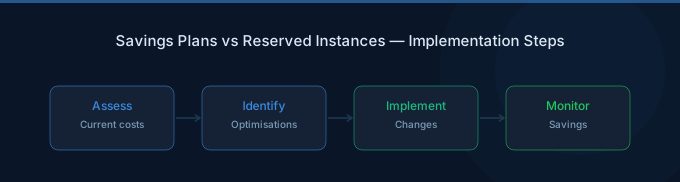
How Are Teams Actually Using Commitments?
Adoption of commitment pricing jumped from 45% to 64% of organizations between 2023 and 2024, with 50% choosing 3-year Compute Savings Plans and 51% using a Savings Plan-only approach with no Reserved Instances at all (ProsperOps, 2025).
That's a clear market signal. The industry is moving toward Savings Plans as the default.
But here's the gap: even among organizations using commitments, the median coverage rate is just 55% — well below the recommended 80-85% target. And the median Effective Savings Rate (ESR) is only 15%. Organizations spending $10M+ on AWS do significantly better, achieving a 38% median ESR, compared to just 23% for mid-market ($500K-$10M) and 0% for smaller accounts under $500K (ProsperOps, 2025).
Why the disparity? Larger organizations have dedicated FinOps teams that actively manage commitment portfolios. Smaller teams buy one Savings Plan and forget about it, or worse — they're afraid of over-committing and buy nothing at all.
Key insight: The "commit to your floor, not your ceiling" rule is critical but most teams get it wrong. Your floor isn't your average usage — it's the minimum usage that never drops below a certain level, even on weekends and holidays. Check your Cost Explorer's lowest hourly spend over the past 90 days. Commit to 80-90% of that number, not your average.
When Do Reserved Instances Still Make Sense?
Reserved Instances aren't dead — they're just niche. Two specific scenarios still justify purchasing RIs over Savings Plans in 2026.
Capacity Reservations
Only Zonal Reserved Instances guarantee capacity in a specific Availability Zone. If your workload absolutely must have an instance available during an outage or capacity crunch, an RI is the only commitment type that provides this guarantee. Savings Plans don't reserve capacity at all.
This matters for production databases, real-time trading systems, and healthcare applications with uptime SLAs. If your compliance team requires guaranteed capacity, RIs are the answer.
Volume Discounts for Large Commitments
RIs offer volume discounts that Savings Plans don't: 5% off for $500K-$4M in commitments, and 10% off for $4M-$10M (nOps, 2025). For organizations with very large, predictable workloads, this stacks on top of the base RI discount and can push effective savings above what Savings Plans achieve.
Marketplace Resale
Standard Reserved Instances can be listed on the AWS Marketplace for resale if your needs change. Convertible RIs and all Savings Plans can't be resold. If you value the ability to exit a commitment early (even at a loss), Standard RIs offer that escape hatch.
Verdict: RIs win only for capacity reservations, volume discounts above $500K, and marketplace resale flexibility. For everything else, Savings Plans are better.
Who Should Choose What?
Startups and fast-growing teams: Choose Compute Savings Plans. Your workloads will change — different instance families, new regions, Fargate migrations, Lambda experiments. You need the flexibility. Commit conservatively (your floor usage) and cover the rest with On-Demand.
Mid-market companies with stable workloads: Layer EC2 Instance Savings Plans on top of a Compute SP base. Use Compute SPs for 60-70% of your baseline, then add EC2 Instance SPs for the extra 6% discount on workloads you know won't change.
Enterprises with $500K+ in commitments: Evaluate RI volume discounts alongside Savings Plans. The 5-10% volume discount on RIs can outweigh Savings Plans for very predictable workloads. But don't go all-in on RIs — keep at least 40% of your commitment in Compute SPs for flexibility.
Teams running Aurora Serverless or DynamoDB: Add Database Savings Plans for up to 35% savings on serverless database workloads. This is new money — no commitment option covered these services before December 2025.
If neither commitment type fits because your usage is too unpredictable or too small, consider group buying through platforms like Wring, which offers up to 45% AWS savings with no long-term commitment.
Related Guides
- AWS EC2 Cost Optimization Guide
- AWS RDS Cost Optimization: Save 30-60% on DBs
- AWS EC2 Pricing Guide
- AWS Fargate Cost Optimization Guide
Frequently Asked Questions
Are AWS Savings Plans better than Reserved Instances?
For most teams, yes. Savings Plans offer comparable discounts (66-72%) with significantly more flexibility — you can change instance families, regions, and even services without losing your discount. 51% of organizations now use a Savings Plan-only approach with no Reserved Instances at all (ProsperOps, 2025). RIs only win if you need capacity reservations or qualify for volume discounts above $500K.
Can I use Savings Plans and Reserved Instances together?
Absolutely, and many large organizations do. AWS applies RI discounts first, then Savings Plan discounts to remaining eligible usage. A common strategy is using EC2 RIs for capacity-sensitive production workloads while covering everything else with Compute Savings Plans. Just watch your total coverage — you don't want to over-commit and pay for unused commitments.
What happens if I buy too much Savings Plan coverage?
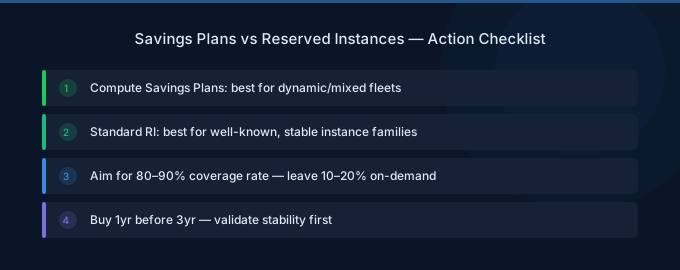
You'll pay for commitment you don't use. Unlike RIs, Savings Plans can't be resold on the AWS Marketplace. That's why the golden rule is to commit to your floor, not your ceiling. Check your minimum hourly spend over the past 90 days and commit to 80-90% of that number. The remaining 10-20% runs at On-Demand rates, which is fine.
Do Database Savings Plans replace Database Reserved Instances?
Not yet. Database Savings Plans (launched December 2025) only cover instance families gen 7+ — db.m7, db.r7, and newer (ProsperOps, 2025). If you're running older families like db.m5, db.r5, db.r6g, or burstable types (db.t3, db.t4g), you still need Database RIs. Plan your instance family migration first, then switch commitment types.
How much can I actually save with AWS commitments?
The median Effective Savings Rate is 15% across all organizations using commitments, but top performers (98th percentile) reach 47% ESR (ProsperOps, 2025). The gap comes down to coverage — organizations spending $10M+ achieve 38% median ESR because they actively manage their commitment portfolio. Smaller teams that buy one Savings Plan and forget about it land around 15-23%.
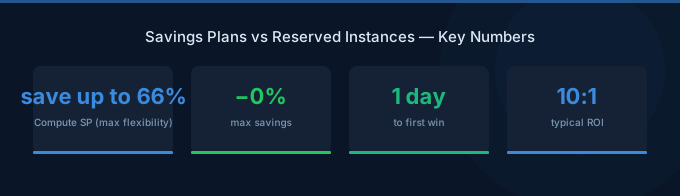
Verdict: Category Winners
| Category | Winner |
|---|---|
| Maximum Discount | Tie — EC2 Instance SP and Standard RI both hit 72% |
| Flexibility | Compute Savings Plans — any instance, region, OS, and service |
| Database Coverage | Database Savings Plans — new in 2025, covers 10 services |
| Capacity Reservation | Reserved Instances — only option that guarantees capacity |
| Ease of Management | Savings Plans — automatic discount application, no exchanges |
| Volume Discounts | Reserved Instances — 5-10% extra for $500K-$10M |
| Marketplace Resale | Reserved Instances — only Standard RIs can be resold |
| Overall | Compute Savings Plans — best balance of savings and flexibility for most teams |
Compute Savings Plans should be your default commitment type in 2026. They offer up to 66% savings with the flexibility to change instance families, migrate to Graviton, shift to Fargate, or expand to new regions without losing a cent. Layer EC2 Instance SPs on top for stable workloads where you want the extra 6%. Use RIs only for capacity reservations or volume discounts.
The biggest mistake isn't choosing the wrong type — it's not committing at all. With 36% of organizations still using zero commitments and the median coverage at just 55%, most teams are leaving 20-40% savings on the table.