Amazon Bedrock gives you access to over 40 foundation models from 10+ providers through a single API — no infrastructure to manage, no GPUs to provision, no model weights to download. You pay per token, and AWS handles everything else.
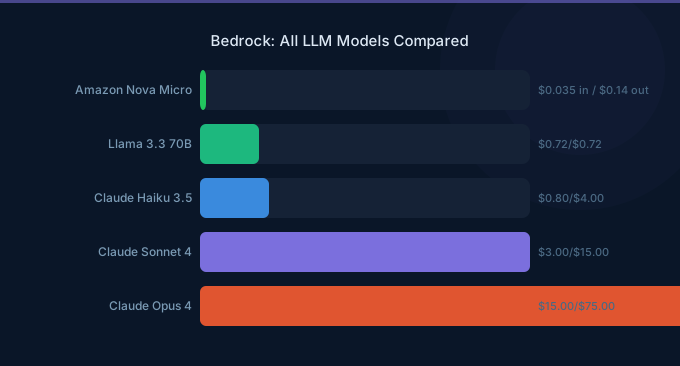
The problem? Choosing the right model. The pricing spread is absurd: Amazon Nova Micro costs $0.035 per million input tokens. Claude 3.5 Sonnet costs $6.00 for the same million tokens — that's a 171x difference. Pick wrong and you'll either overspend on capabilities you don't need, or under-deliver with a model that can't handle the job.
72% of organizations now use generative AI cloud services, up from 47% in 2024 (Flexera, 2025). AWS generated $128.7 billion in revenue in 2025, with its fastest growth in 13 quarters (Amazon IR, 2026). Bedrock is a major driver of that growth.
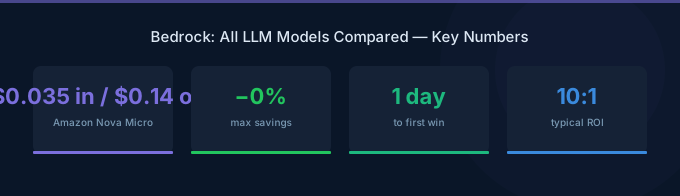
TL;DR: Bedrock offers 40+ models from Amazon, Anthropic, Meta, DeepSeek, Google, Mistral, Cohere, AI21 Labs, MiniMax, and Stability AI. For most use cases, start with Amazon Nova Micro ($0.035/$0.14 per 1M tokens) for simple tasks and Nova Pro ($0.80/$3.20) for complex reasoning. Use Claude 3.5 Sonnet ($6/$30) only when you need top-tier intelligence. Batch inference saves 50% across all models.
How Bedrock Pricing Works
Before diving into individual models, you need to understand how Bedrock charges you. There are four pricing tiers:
| Pricing Mode | How It Works | Best For | Savings |
|---|---|---|---|
| On-Demand | Pay per token, no commitment | Variable workloads, prototyping | Baseline |
| Batch | Submit jobs, get results later (up to 24hr) | Large-scale processing, data pipelines | 50% off |
| Provisioned Throughput | Reserve model capacity per hour | Predictable, high-volume production | Up to 30-40% |
| Cross-Region Inference | Route to regions with available capacity | Avoiding throttling, higher throughput | Varies |
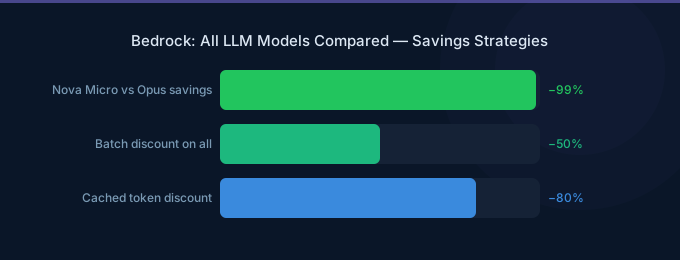
The golden rule: If your workload can tolerate latency, always use batch inference. A flat 50% discount on every model is hard to beat.
Two key terms:
- Input tokens = what you send to the model (your prompt, context, documents)
- Output tokens = what the model generates (its response). Always more expensive than input tokens.
Amazon Nova Models — The Budget Kings
Amazon's own model family launched at re:Invent 2024 and has become the default choice for cost-conscious teams. These models are built to be cheap and fast.
| Model | Input / 1M Tokens | Output / 1M Tokens | Context Window | Modality | Best For |
|---|---|---|---|---|---|
| Nova Micro | $0.035 | $0.14 | 128K | Text only | Quick Q&A, classification, routing |
| Nova Lite | $0.06 | $0.24 | 300K | Text, image, video | Document analysis, image understanding |
| Nova Pro | $0.80 | $3.20 | 300K | Text, image, video | Complex reasoning, agents, RAG |
| Nova Premier | $2.00 | $15.00 | 1M+ | Text, image, video | Hardest tasks, distillation teacher |
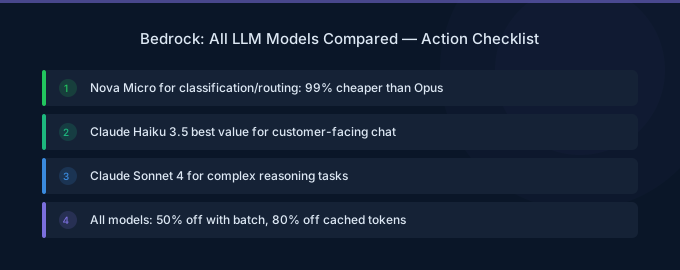
Our take: Nova Micro at $0.035/M input is the cheapest model on Bedrock, period. We've seen customers cut their Bedrock bill by 60-70% just by routing simple classification and extraction tasks to Nova Micro instead of Claude.
When to Use Nova
- Nova Micro: Chatbots, FAQ bots, intent classification, data extraction from structured text. If the task doesn't require "thinking," Nova Micro handles it.
- Nova Lite: When you need to process images or videos alongside text. Product image analysis, document OCR, video summarization. The 300K context window is huge for document-heavy workflows.
- Nova Pro: The sweet spot for AI agents, complex RAG pipelines, and multi-step reasoning. Roughly 10x cheaper than Claude Sonnet for comparable agentic tasks.
- Nova Premier: Only use this when you're fine-tuning other models using Nova Premier as the teacher, or for the absolute hardest reasoning tasks.
Anthropic Claude Models — The Intelligence Leaders
Anthropic's Claude models consistently rank at the top of reasoning benchmarks. They're the most expensive text models on Bedrock, but for tasks that demand deep understanding, nuanced analysis, or complex code generation, nothing else comes close.
| Model | Input / 1M Tokens | Output / 1M Tokens | Context Window | Strengths |
|---|---|---|---|---|
| Claude 3 Haiku | $0.25 | $1.25 | 200K | Fast, cheap, good at structured output |
| Claude 3.5 Haiku | $0.80 | $4.00 | 200K | Upgraded Haiku with better reasoning |
| Claude 3.5 Sonnet v2 | $3.00 | $15.00 | 200K | Best price/performance for complex tasks |
| Claude 3.5 Sonnet | $6.00 | $30.00 | 200K | Extended thinking, deepest reasoning |
| Claude Opus 4 | $15.00 | $75.00 | 200K | Most capable, highest cost |
Claude's pricing includes a prompt caching feature that can dramatically reduce costs for repetitive workloads:
- Cache write: $7.50/M tokens (one-time cost to cache a prompt)
- Cache read: $0.60/M tokens (90% cheaper than re-sending the prompt)
If you're sending the same system prompt or document context across hundreds of requests, prompt caching can cut your Claude costs by 80-90% on the cached portion.
When to Use Claude
- Claude 3 Haiku: Simple structured extraction, JSON generation, summarization where format matters more than depth
- Claude 3.5 Sonnet v2: The workhorse — code generation, analysis, complex writing, tool use. Best model for the price when reasoning quality matters
- Claude Opus 4: Only for tasks where Sonnet genuinely fails — extremely complex multi-step reasoning, nuanced legal/medical text analysis, or when accuracy justifies the 5x cost premium
Meta Llama Models — Open-Source on Bedrock
Meta's Llama family is the most popular open-source model ecosystem. Running them through Bedrock means you get the open-source flexibility without managing GPU infrastructure.
| Model | Input / 1M Tokens | Output / 1M Tokens | Context Window | Parameters |
|---|---|---|---|---|
| Llama 3.1 8B Instruct | $0.22 | $0.22 | 128K | 8B |
| Llama 3.1 70B Instruct | $0.72 | $0.72 | 128K | 70B |
| Llama 3.1 405B Instruct | $2.13 | $2.13 | 128K | 405B |
| Llama 3.2 1B/3B | $0.10 | $0.10 | 128K | 1-3B |
| Llama 3.3 70B | $0.72 | $0.72 | 128K | 70B |
| Llama 4 Scout | $0.17 | $0.17 | 10M | 17B active (109B total) |
| Llama 4 Maverick | $0.20 | $0.80 | 1M | 17B active (400B total) |
Notice something unusual? Most Llama models charge the same price for input and output tokens. That's different from every other provider on Bedrock and makes cost estimation much simpler.
Llama 4: The New Generation
Llama 4 Scout and Maverick are Meta's latest release and deserve special attention:
- Llama 4 Scout: A Mixture-of-Experts (MoE) model with 17B active parameters out of 109B total. The 10 million token context window is the largest on Bedrock — 50x larger than Claude. At $0.17/M tokens, it's cheaper than most alternatives.
- Llama 4 Maverick: Larger MoE model (400B total) with stronger reasoning. The 1M context window and $0.80 output pricing put it in direct competition with Nova Pro.
When to Use Llama
- Llama 3.2 1B/3B: Lightest possible model for simple tasks. At $0.10/M tokens, only Nova Micro is cheaper.
- Llama 3.3 70B: Solid all-rounder at $0.72/M tokens. Good alternative to Nova Pro if you prefer open-source.
- Llama 4 Scout: When you need massive context windows (10M tokens = entire codebases, book-length documents).
- Llama 4 Maverick: When you want strong reasoning from an open-source model without paying Claude prices.
DeepSeek, Gemma, Mistral, and More
Bedrock also hosts models from several other providers. Here are the most notable:
DeepSeek
| Model | Input / 1M Tokens | Output / 1M Tokens | Notes |
|---|---|---|---|
| DeepSeek V3.2 | $0.62 | $1.85 | Strong reasoning, competitive with Claude at 1/5 the price |
DeepSeek V3.2 is a sleeper pick. It punches well above its price class on coding and reasoning benchmarks. If you're building code generation pipelines, test DeepSeek before defaulting to Claude.
Google Gemma
| Model | Input / 1M Tokens | Output / 1M Tokens | Parameters |
|---|---|---|---|
| Gemma 3 4B | $0.04 | $0.08 | 4B |
| Gemma 3 12B | $0.09 | $0.29 | 12B |
| Gemma 3 27B | $0.23 | $0.38 | 27B |
Google's Gemma models are extremely cheap and surprisingly capable for their size. Gemma 3 4B at $0.04/$0.08 is the second cheapest model on Bedrock after Nova Micro.
Mistral AI
| Model | Input / 1M Tokens | Output / 1M Tokens | Notes |
|---|---|---|---|
| Mistral 7B Instruct | $0.15 | $0.20 | Budget European model |
| Mixtral 8x7B | $0.45 | $0.70 | MoE architecture |
| Mistral Large | $2.00 | $6.00 | Flagship, multilingual |
Mistral is popular with European companies due to EU data sovereignty considerations. Mistral Large handles multilingual tasks (especially French, German, Spanish) better than most US-trained models.
MiniMax
| Model | Input / 1M Tokens | Output / 1M Tokens |
|---|---|---|
| MiniMax M2 | $0.30 | $1.20 |
| MiniMax M2.1 | $0.30 | $1.20 |
Cohere
| Model | Pricing | Notes |
|---|---|---|
| Rerank 3.5 | $2.00 per 1,000 queries | Specialized for search ranking, not general text |
| Command R | Usage-based | Document grounding and RAG |
| Command R+ | Usage-based | Flagship, best for enterprise RAG |
AI21 Labs
| Model | Notes |
|---|---|
| Jamba 1.5 Mini | SSM-Transformer hybrid, 256K context |
| Jamba 1.5 Large | Longer documents, structured output |
Stability AI
| Model | Notes |
|---|---|
| Stable Diffusion XL 1.0 | Image generation, $0.04 per image |
| Stable Image Core | Higher quality images, $0.04 per image |
| Stable Image Ultra | Highest quality, $0.08 per image |
The Complete Pricing Comparison
Here's the full landscape sorted by output cost — the number that usually matters most for your bill:
How to Pick the Right Model
Don't overthink this. Match the task complexity to the model tier:
| Task Complexity | Example Tasks | Recommended Model | Output Cost/1M |
|---|---|---|---|
| Trivial | Intent classification, spam detection, simple extraction | Gemma 3 4B or Nova Micro | $0.08-0.14 |
| Simple | Summarization, FAQ answering, formatting | Llama 4 Scout or Nova Lite | $0.17-0.24 |
| Moderate | RAG responses, email drafting, data analysis | Llama 3.3 70B or DeepSeek V3.2 | $0.72-1.85 |
| Complex | AI agents, multi-step reasoning, code generation | Nova Pro or Claude 3.5 Haiku | $3.20-4.00 |
| Expert | Legal analysis, medical reasoning, research synthesis | Claude 3.5 Sonnet v2 | $15.00 |
| Frontier | The hardest 1% of tasks only | Claude Opus 4 | $75.00 |
The 80/20 rule for model selection: In our experience, 80% of production workloads can run on models costing less than $1/M output tokens. The remaining 20% need Claude-tier intelligence. Smart teams use a router — send easy requests to Nova Micro, route complex ones to Claude. This typically cuts Bedrock spend by 50-70% compared to running everything through one model.
Bedrock Features Beyond Model Access
Bedrock isn't just an API gateway for LLMs. Several built-in features affect your total cost:
Knowledge Bases (RAG)
Bedrock Knowledge Bases let you connect your documents (S3, Confluence, SharePoint) and automatically retrieve relevant context for each query. This is managed RAG — no vector database to maintain.
Pricing: Storage in your chosen vector store (OpenSearch Serverless, Aurora, Pinecone) + model inference costs for embedding and generation.
Agents
Bedrock Agents let you build autonomous AI workflows that call APIs, query databases, and chain multiple steps. Think of them as serverless AI agents — you define the tools, Bedrock orchestrates the execution.
Pricing: Model inference costs for each step, plus any API/Lambda costs your agent invokes.
Guardrails
Content filtering, PII redaction, and topic blocking built into the API layer. Essential for production deployments.
Pricing: Small per-request fee on top of model costs.
Model Evaluation
Compare models side-by-side on your own test data before committing. This prevents the most expensive mistake: picking a model that's too powerful (and too expensive) for your actual workload.
Cost Optimization Strategies for Bedrock
84% of organizations say managing cloud spend is their top challenge (Flexera, 2025). Bedrock is no exception. Here's how to keep costs under control:
1. Use Batch Inference Wherever Possible
If you don't need real-time responses, batch inference saves 50% on every model. Ideal for: nightly report generation, document processing pipelines, bulk classification, email triage systems.
2. Implement Model Routing
Don't use one model for everything. Route requests based on complexity:
- Simple extraction → Nova Micro ($0.14/M output)
- General conversation → Nova Lite ($0.24/M output)
- Complex reasoning → Claude 3.5 Sonnet v2 ($15/M output)
A basic routing layer (even a simple keyword classifier) can cut your Bedrock bill by 50-70%.
3. Use Prompt Caching with Claude
If you're using Claude models with a long system prompt or shared context, enable prompt caching. Cache write costs $7.50/M tokens once, but subsequent reads cost only $0.60/M tokens — 90% cheaper than resending the full prompt every time.
4. Monitor with CloudWatch
Set up CloudWatch alarms for Bedrock API costs. A runaway agent loop can burn through hundreds of dollars in minutes. Set a daily spend threshold and get alerted before it becomes a problem.
5. Compress Your Prompts
Most prompts contain unnecessary context. Trimming prompt length by 30% directly reduces input token costs by 30%. Review your system prompts monthly and remove anything the model doesn't actually need.
Cost reduction tip: Teams that implement model routing + batch inference typically reduce their Bedrock spend by 60-75% within the first month. The biggest wins come from moving classification tasks off Claude onto Nova Micro — same accuracy, 100x cheaper.
Related Guides
- AWS Bedrock Pricing Guide
- AWS Bedrock vs OpenAI Pricing
- AWS Bedrock Guardrails Guide
- AWS Bedrock Fine-Tuning Guide
Frequently Asked Questions
Is there a free tier for Amazon Bedrock?
Yes. New AWS accounts get a limited free tier for select Bedrock models. The exact allocation varies by model and changes periodically — check the Bedrock pricing page for current free tier details. See also the supported models documentation. Beyond that, you pay per token with no minimum commitment.
Can I fine-tune models on Bedrock?
Yes, Bedrock supports custom model training (fine-tuning) for select models including Amazon Titan and certain Llama variants. You pay for training time (per model unit per hour) plus hosting the custom model. Fine-tuning is worth exploring if you have domain-specific data that improves output quality enough to justify the upfront training cost.
How does Bedrock pricing compare to OpenAI's API?
Bedrock's pricing is generally competitive. Claude 3.5 Sonnet v2 on Bedrock ($3/$15 batch) competes directly with GPT-4o ($2.50/$10). The advantage of Bedrock is model choice — you're not locked into one provider. If OpenAI raises prices, you switch to Nova or Llama. If Anthropic releases a better model, you switch to Claude. Multi-model access is built in.
What's the cheapest way to run an AI chatbot on Bedrock?
Amazon Nova Micro at $0.035 input / $0.14 output per 1M tokens. For a chatbot handling 1,000 conversations per day with ~500 tokens per response, that's roughly $2.10/month in Bedrock costs. Add a Lightsail or Lambda backend and you're running a production chatbot for under $25/month total.
Can I use multiple models in the same application?
Absolutely. Bedrock's API is model-agnostic — switch models by changing the model ID in your API call. Many production applications use 2-3 models: a cheap model for simple tasks, a mid-tier model for general work, and a premium model for complex reasoning. Bedrock's Intelligent Prompt Routing feature can even automate this selection.
Start Building with the Right Model
Bedrock's model catalog is massive and growing. Don't get paralyzed by choice. Start here:
- Prototype with Nova Micro — it's the cheapest and fastest. If it can't handle your task, you'll know immediately
- Upgrade to Nova Pro or Llama 3.3 70B for tasks that need more reasoning
- Reserve Claude for the complex 20% of tasks that actually need it
- Enable batch inference for any non-real-time workload — instant 50% savings The gap between the cheapest and most expensive model is 937x. That's not a rounding error — it's the difference between a $50/month AI bill and a $46,000/month one. Choose wisely.