DynamoDB is AWS's fully managed NoSQL database — and the pricing model confuses everyone. Unlike RDS where you pick an instance size, DynamoDB charges per request (On-Demand) or per capacity unit (Provisioned). Pick the wrong mode and you'll either overpay by 6x or hit throttling during traffic spikes.
The biggest mistake: running On-Demand mode on a predictable workload. A table handling 1,000 writes/second costs $3,375/month on On-Demand but only $780/month with Provisioned capacity — and $468/month with Reserved capacity.
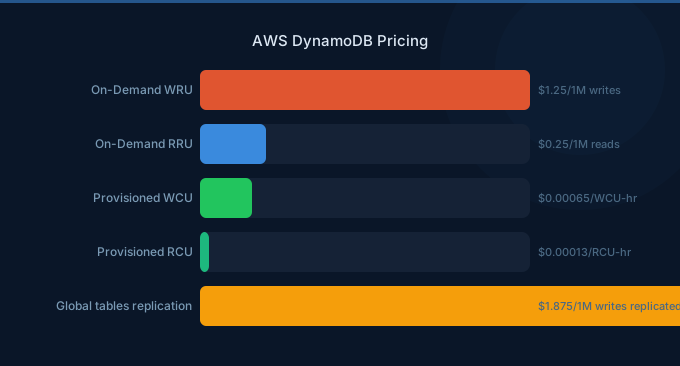
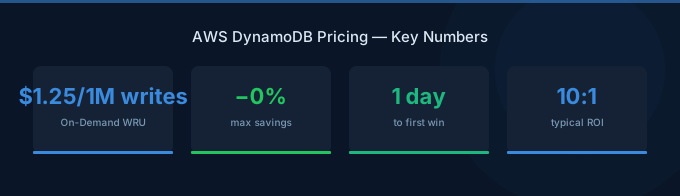
TL;DR: On-Demand mode costs $1.25 per million write request units and $0.25 per million read request units. Provisioned capacity costs $0.00065/WCU-hour and $0.00013/RCU-hour. Reserved capacity (1-year) saves ~53%, and 3-year saves ~77%. Storage is $0.25/GB/month. The free tier gives 25 WCUs, 25 RCUs, and 25GB storage — always free, not just 12 months.
On-Demand vs Provisioned: The Core Pricing Decision
On-Demand Mode
You pay per request with no capacity planning. Best for unpredictable or spiky workloads:
| Operation | Price per Million Units |
|---|---|
| Write Request Unit (WRU) | $1.25 |
| Read Request Unit (RRU) | $0.25 |
| Replicated Write (Global Tables) | $1.875 |
One WRU = one write for items up to 1KB. Larger items consume more units (a 3KB item = 3 WRUs). One RRU = one strongly consistent read for items up to 4KB, or two eventually consistent reads.
Provisioned Mode
You pre-set read and write capacity. Best for predictable workloads:
| Component | Price |
|---|---|
| Write Capacity Unit (WCU) | $0.00065/hour (~$0.4745/month) |
| Read Capacity Unit (RCU) | $0.00013/hour (~$0.0949/month) |
One WCU = one write/second sustained. One RCU = one strongly consistent read/second (or two eventually consistent reads/second).
When to Use Which
| Factor | On-Demand | Provisioned |
|---|---|---|
| Traffic pattern | Spiky, unpredictable | Steady, predictable |
| Cost at 100 writes/sec | $338/month | $47/month |
| Cost at 0 writes/sec | $0 | $47/month (still charged) |
| Scaling | Instant (up to 2x previous peak) | Auto-scaling with lag |
| Throttling risk | Low (but can hit account limits) | Higher if under-provisioned |
| Best for | New apps, dev/test, event-driven | Production with baseline traffic |

Reserved Capacity: Up to 77% Off
For Provisioned mode tables with predictable capacity needs, Reserved Capacity locks in a lower rate:
| Commitment | WCU $/hr | Monthly Equivalent | Savings vs On-Demand |
|---|---|---|---|
| On-Demand | — | $1.25/million writes | — |
| Provisioned (no RI) | $0.00065 | $0.4745/WCU | ~62% |
| 1-Year Reserved | $0.000304 | $0.2219/WCU | ~53% vs Provisioned |
| 3-Year Reserved | $0.000111 | $0.081/WCU | ~77% vs Provisioned |
A table needing 1,000 WCUs:
| Mode | Monthly Cost |
|---|---|
| On-Demand (sustained) | $3,375 |
| Provisioned | $474 |
| 1-Year Reserved | $222 |
| 3-Year Reserved | $81 |
The hidden trap of On-Demand: We see teams launch with On-Demand mode during development, then forget to switch to Provisioned once traffic stabilizes. A table doing 500 sustained writes/second costs $1,688/month On-Demand but only $234/month with Provisioned + Reserved. That's $17,448/year in waste per table.
Storage Pricing
DynamoDB storage is simple — but there are now two tiers:
| Storage Class | $/GB/Month | Best For |
|---|---|---|
| Standard | $0.25 | Active data, most workloads |
| Infrequent Access (IA) | $0.10 | Tables accessed less than 20% of the time |
IA tables have higher read/write costs ($1.56/million WRU vs $1.25 for On-Demand), so the break-even is when storage costs dominate. For a table with 100GB and light traffic, IA saves ~$15/month on storage but may cost more on requests.
Indexes add to storage costs. Global Secondary Indexes (GSIs) store a copy of the projected attributes. A table with 50GB of data and 3 GSIs projecting all attributes = 200GB of storage = $50/month on Standard.
Global Tables: Multi-Region Replication
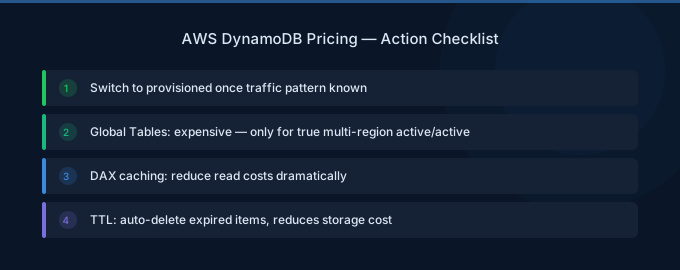
Global Tables replicate your data across AWS regions for low-latency global access. The cost: replicated writes.
| Component | Price |
|---|---|
| Replicated WRU (On-Demand) | $1.875 per million |
| Replicated WCU (Provisioned) | $0.000975/hour |
| Storage | $0.25/GB per region |
| Data transfer between regions | Included (no extra charge) |
The key insight: each region maintains a full copy. A 100GB table replicated to 3 regions = 300GB of storage charges ($75/month). Replicated writes cost 50% more than standard writes.
| Setup | Write Cost (1,000 w/s sustained, On-Demand) | Storage (100GB) |
|---|---|---|
| Single region | $3,375/month | $25/month |
| 2 regions | $5,063/month | $50/month |
| 3 regions | $6,750/month | $75/month |
DynamoDB Accelerator (DAX)
DAX is an in-memory cache for DynamoDB that delivers microsecond read latency (see the DynamoDB developer guide for setup):
| Node Type | vCPUs | RAM | $/hr | ~$/Month |
|---|---|---|---|---|
| dax.t3.small | 2 | 2 GiB | $0.04 | $29 |
| dax.t3.medium | 2 | 4 GiB | $0.08 | $58 |
| dax.r5.large | 2 | 16 GiB | $0.269 | $196 |
| dax.r5.xlarge | 4 | 32 GiB | $0.538 | $393 |
| dax.r5.2xlarge | 8 | 64 GiB | $1.076 | $785 |
DAX requires a minimum 3-node cluster for production. A 3-node dax.r5.large cluster = $588/month. Use DAX only when read latency requirements demand it and your read-to-write ratio is high (10:1+).
DAX vs ElastiCache: DAX is purpose-built for DynamoDB and requires zero application code changes if you use the DynamoDB SDK. But ElastiCache (Redis) at $0.068/hr for a cache.r6g.large offers more flexibility, supports more use cases, and costs 62% less per node. If you're already using ElastiCache, adding a DynamoDB caching layer there is often cheaper than DAX.
Backup and Restore Pricing
| Feature | Price |
|---|---|
| On-demand backup | $0.10/GB/month |
| Continuous backups (PITR) | $0.20/GB/month |
| Restore | $0.15/GB |
Point-in-Time Recovery (PITR) lets you restore your table to any second in the last 35 days. For a 100GB table, PITR costs $20/month — cheap insurance for critical data.
On-demand backups persist until you delete them. Like RDS snapshots, forgotten backups accumulate costs quietly.
DynamoDB Streams
| Component | Price |
|---|---|
| Read request units | $0.02 per 100,000 reads |
| Data retention | 24 hours (free) |
Streams capture item-level changes and are essential for triggers (Lambda), replication, and analytics pipelines. The cost is negligible for most workloads — 1 million stream reads = $0.20.
The Free Tier (Always Free)
DynamoDB's free tier is unusually generous and never expires:
| Resource | Free Amount |
|---|---|
| Read Capacity Units | 25 RCUs |
| Write Capacity Units | 25 WCUs |
| Storage | 25 GB |
| DynamoDB Streams reads | 2.5 million |
| Data transfer out | 1 GB/month |
25 WCUs = 25 writes/second sustained = ~65 million writes/month. 25 RCUs = 25 strongly consistent reads/second = ~65 million reads/month. For small applications, DynamoDB can be genuinely free indefinitely.
Real-World Cost Examples
Example: SaaS Session Store
| Component | Specification | Monthly Cost |
|---|---|---|
| Table capacity | 100 WCU, 200 RCU (Provisioned) | $66 |
| Storage | 20 GB | $5 |
| PITR backups | 20 GB | $4 |
| DynamoDB Streams | 500K reads/month | $0.10 |
| Total | $75 |
With 1-Year Reserved Capacity: ~$38/month (49% savings).
Example: IoT Telemetry Ingestion
| Component | Specification | Monthly Cost |
|---|---|---|
| Table capacity | 2,000 WCU, 500 RCU (Provisioned) | $995 |
| Storage (growing) | 500 GB | $125 |
| GSI (1 index) | 200 WCU, 500 RCU | $142 |
| PITR backups | 500 GB | $100 |
| Total | $1,362 |
With 3-Year Reserved Capacity: ~$420/month (69% savings).
Cost Optimization Strategies
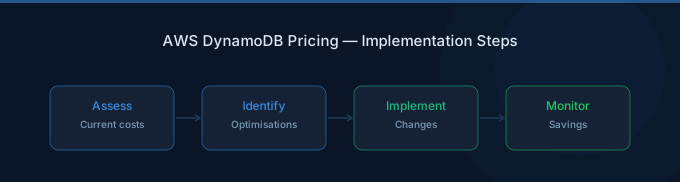
1. Switch from On-Demand to Provisioned + Auto-Scaling
If your table has had consistent traffic for 2+ weeks, switch to Provisioned mode with auto-scaling. Set the target utilization to 70% for a balance between cost and headroom. Immediate savings: 60-85%.
2. Use Reserved Capacity for Baseline Load
Buy Reserved Capacity to cover your minimum sustained traffic. Let auto-scaling handle peaks above the baseline. This hybrid approach maximizes savings while maintaining flexibility.
3. Enable DynamoDB Standard-IA for Cold Tables
Tables accessed infrequently (audit logs, historical data, compliance records) save 60% on storage with the Infrequent Access class. Run a CloudWatch analysis on read/write patterns before switching.
4. Optimize Item Size
DynamoDB charges per WRU (1KB) and RRU (4KB). A 4.1KB item costs 5 WRUs to write instead of 4. Compress large attributes, store blobs in S3 instead of DynamoDB, and use sparse indexes.
5. Choose Eventually Consistent Reads
Eventually consistent reads cost half of strongly consistent reads (you get 2 reads per RCU instead of 1). For most applications — dashboards, feeds, product catalogs — eventual consistency is acceptable.
6. Clean Up Unused GSIs
Each Global Secondary Index maintains its own capacity and storage. An unused GSI with 100 WCU still costs $47/month. Audit your GSIs quarterly and delete any that aren't actively queried.
Related Guides
- AWS DynamoDB Cost Optimization: Cut NoSQL Costs
- AWS RDS Pricing Guide
- AWS Aurora Pricing Guide
- AWS ElastiCache Pricing Guide
Frequently Asked Questions
How much does DynamoDB cost per month?
A small application (5GB data, low traffic) can run within the always-free tier at $0/month. A typical SaaS workload (20GB, 100 writes/sec) costs $75-150/month with Provisioned capacity. High-traffic applications (500+ writes/sec) range from $400-2,000/month depending on mode and Reserved Capacity usage.
Is DynamoDB cheaper than RDS?
For read-heavy, key-value workloads — yes. DynamoDB's free tier alone (25GB, 25 WCU/RCU) handles more than the cheapest RDS instance ($12/month). But for complex queries, joins, and relational data, RDS is more cost-effective because DynamoDB requires expensive table scans and multiple queries to achieve what SQL does in one.
What's the difference between WCU and WRU?
WCU (Write Capacity Unit) is used in Provisioned mode — it represents sustained capacity (1 write/second). WRU (Write Request Unit) is used in On-Demand mode — it represents a single write operation. One WCU sustained for a month handles ~2.6 million writes and costs $0.47. The same 2.6 million writes On-Demand cost $3.25.
Should I use DAX or ElastiCache for caching?
Use DAX if you need microsecond read latency and want zero code changes (DAX is API-compatible with DynamoDB). Use ElastiCache Redis if you're caching data from multiple sources, need pub/sub, or want more control over caching logic. ElastiCache is typically 40-60% cheaper per node.
Can I switch between On-Demand and Provisioned mode?
Yes, you can switch once every 24 hours. Switch to On-Demand for unpredictable events (product launches, flash sales) and back to Provisioned afterward. Each switch takes effect within minutes.
Control Your DynamoDB Spend
DynamoDB pricing rewards you for understanding your access patterns. The difference between the cheapest and most expensive configuration for the same workload is 7x:
- Analyze traffic patterns — Use CloudWatch to determine if your workload is steady or spiky
- Switch to Provisioned + Auto-Scaling — 60-85% cheaper than On-Demand for steady workloads
- Buy Reserved Capacity — 53-77% off Provisioned pricing for baseline capacity
- Use IA storage — 60% savings on cold tables
- Audit GSIs — Delete unused indexes that silently consume capacity