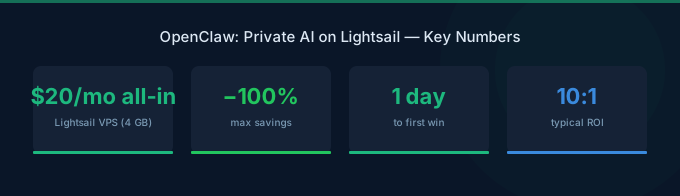
AWS just launched OpenClaw on Amazon Lightsail on March 4, 2026 — an open-source, self-hosted AI agent that runs entirely in your own AWS account (AWS News Blog, 2026). No shared servers. No data leaving your infrastructure. Full autonomy over your AI assistant from $20/month.
This isn't another chatbot. OpenClaw acts as an autonomous agent that connects to WhatsApp, Discord, Telegram, and Slack — managing emails, browsing the web, and organizing files without you babysitting every step. It runs on Amazon Bedrock, so you get access to Claude, Llama, Amazon Nova, and dozens of other models out of the box.
Why this matters now: 72% of IT leaders cite data privacy as their top concern with AI adoption (Cisco AI Readiness Index, 2024). OpenClaw solves this by keeping everything inside your AWS account — no third-party has access to your conversations, files, or agent actions.
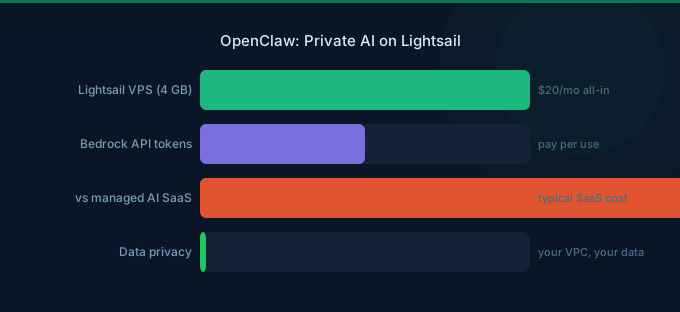
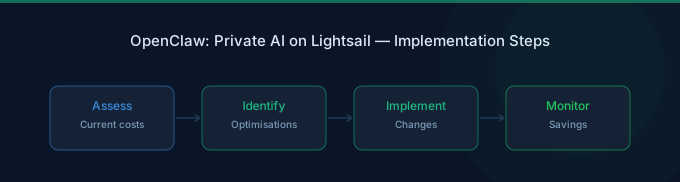
TL;DR: OpenClaw is an open-source autonomous AI agent that runs on Amazon Lightsail with Amazon Bedrock as the default model provider. Setup takes under 10 minutes. The 4GB plan costs $20/month plus Bedrock token costs (~$0.50-2/month for typical use with Nova Micro). It connects to WhatsApp, Discord, Telegram, and Slack, with built-in sandboxing, one-click HTTPS, and automatic snapshots.
What Is OpenClaw and Why Should You Care?
OpenClaw is an open-source project that turns an Amazon Lightsail instance into a fully autonomous AI assistant. Unlike ChatGPT or Google Gemini, your data never leaves your AWS account. Unlike local tools like Ollama or Jan.ai, you don't need a beefy GPU sitting on your desk.
Here's the core difference: traditional AI chatbots answer questions. OpenClaw performs tasks. It browses the web for you, manages your calendar, sends messages across platforms, and organizes files — autonomously.
The AI agent market is projected to reach $47.1 billion by 2030, growing at 44.8% CAGR (MarketsandMarkets, 2024). Gartner predicts 33% of enterprise software will include agentic AI by 2028, up from less than 1% in 2024 (Gartner, 2024). OpenClaw lets you get started with this technology today — privately and affordably.
What OpenClaw Can Do
- Messaging integration — Connect to WhatsApp (2.78 billion users globally), Discord, Telegram, and Slack from a single dashboard
- Autonomous task execution — Browse the web, manage emails, organize files, and complete multi-step workflows
- Model flexibility — Amazon Bedrock as default provider, with access to Claude, Llama, Amazon Nova, Mistral, and more
- Privacy by design — Everything runs in your AWS account with sandboxed agent sessions
What You'll Need Before Starting
Before you deploy OpenClaw, make sure you have:
- An AWS account with billing enabled
- Amazon Bedrock model access enabled in your target region (you need to request access to specific models in the Bedrock console)
- A web browser for the Lightsail console and OpenClaw dashboard
- 10 minutes of setup time
- Difficulty: Beginner — no DevOps experience needed
Estimated monthly cost:
| Component | Cost |
|---|---|
| Lightsail 4GB instance | $20.00/month |
| Bedrock tokens (light use, Nova Micro) | ~$0.50-2.00/month |
| Bedrock tokens (heavy use, Claude Sonnet) | ~$15-50/month |
| Total (typical) | $20-22/month |
Step 1: Create Your Lightsail Instance
By the end of this step, you'll have a running OpenClaw instance in your AWS account.
- Open the Amazon Lightsail console
- Click Create instance
- Choose your preferred AWS Region and Availability Zone — pick the region closest to you for lowest latency
- Under Select a blueprint, choose OpenClaw
- Select the 4GB plan ($20/month) — AWS recommends this for optimal performance. The 2GB plan works for light usage, but you'll hit memory limits with larger models
- Enter a name for your instance (e.g.,
my-openclaw-agent) - Click Create instance
Your instance will reach a "Running" state within 2-3 minutes. Don't close the browser — you'll need it for the next step.
Cost tip: If you're just testing, Lightsail charges hourly ($0.0267/hour for the 4GB plan). Spin it up, try it for a few hours, and delete it if it's not for you. That's less than $1 for a test run.
Step 2: Pair Your Browser with OpenClaw
Before you can use the OpenClaw dashboard, you need to create a secure connection between your browser and the instance. This device pairing replaces traditional password-based authentication — no passwords to remember or leak.
- In the Lightsail console, navigate to your OpenClaw instance
- Click Connect using SSH in the Getting Started tab
- A browser-based SSH terminal opens — you'll see the dashboard URL and security credentials in the welcome message
- Copy the dashboard URL and open it in your browser
- Enter the pairing code displayed in the SSH terminal
- Your browser is now securely paired with your OpenClaw instance
What happens behind the scenes: OpenClaw uses device-based authentication instead of passwords. Only paired devices can access your dashboard. If you want to access from a second device (e.g., your phone), repeat the pairing process from the SSH terminal.
Step 3: Configure Your AI Model
OpenClaw ships pre-configured with Amazon Bedrock as the default AI model provider. Once you complete the setup wizard, you can start chatting immediately — no additional configuration required.
But here's where it gets interesting: you can choose which model powers your agent. The tradeoff is always cost vs. capability.
Which Model Should You Pick?
| Use Case | Recommended Model | Why |
|---|---|---|
| Quick Q&A, scheduling, reminders | Nova Micro ($0.14/M output) | Fast, dirt cheap, good enough for simple tasks |
| Summarizing documents, drafting messages | Nova Lite ($0.24/M output) | Handles longer context at minimal cost |
| Complex reasoning, multi-step tasks | Nova Pro ($3.20/M output) | Best balance of capability and cost for agents |
| Code generation, analysis | Claude 3.5 Sonnet ($15.00/M output) | Top-tier reasoning, but 107x the cost of Nova Micro |
| Open-source preference | Llama 3.3 70B ($0.99/M output) | Strong open-source option under $1/M tokens |
Our recommendation: Start with Nova Micro for everyday agent tasks. It handles 80% of what you'll throw at it, and your Bedrock bill will stay under $2/month. Switch to Nova Pro or Claude for tasks that actually need deeper reasoning.
To change models in OpenClaw, open the dashboard settings and swap the Bedrock model endpoint. You can switch models at any time — no restart needed.
Step 4: Connect Your Messaging Apps
This is where OpenClaw becomes genuinely useful. Instead of switching between five different apps, your AI agent meets you where you already are.
WhatsApp has over 2 billion active users worldwide, making it the most common integration. Connect via the WhatsApp Business API or web bridge in your OpenClaw settings.
Discord
Create a bot in the Discord Developer Portal, grab the bot token, and paste it into OpenClaw's Discord integration settings. Your agent will appear as a bot in your server.
Telegram
Talk to @BotFather on Telegram, create a new bot, copy the API token, and add it to OpenClaw's Telegram settings. Takes about 2 minutes.
Slack
Set up a Slack App at api.slack.com/apps with bot token OAuth scopes for messaging. Add the bot to your workspace and configure the token in OpenClaw.
Pro tip: You don't have to connect all four platforms at once. Start with the one you use most. Each messaging integration runs independently — adding Discord doesn't affect your WhatsApp connection.
Step 5: Review Security and IAM Permissions
OpenClaw ships with strong defaults, but you should understand what's happening under the hood.
Built-in Security
Every Lightsail OpenClaw instance includes:
- Sandboxed agent sessions — Each agent task runs in isolation, preventing unintended side effects
- One-click HTTPS — TLS encryption is pre-configured. No manual certificate setup, no reverse proxy headaches
- Device pairing authentication — Only your authorized devices can access the dashboard
- Automatic snapshots — Your configuration is backed up continuously. If something breaks, restore in one click
IAM Permissions
The OpenClaw setup script creates an IAM role with a policy granting access to Amazon Bedrock. The default policy looks like this:
You can customize this policy at any time through the IAM console. If you only want your agent to use Nova Micro, restrict the resource ARN to that specific model. Least privilege always wins.
OpenClaw vs. the Alternatives
OpenClaw isn't the only self-hosted AI option. But it solves a different problem than most alternatives.
The key difference: Jan.ai, LocalAI, and Open WebUI are free software, but they require a GPU for inference. A decent GPU (RTX 4090) costs $1,500+, or you rent cloud GPUs for $100-300/month. OpenClaw sidesteps this entirely by using Bedrock's API — no GPU needed, and your Lightsail instance runs on standard (cheap) compute.
The trade-off is clear: with OpenClaw, your data stays in your AWS account but passes through Bedrock's API. With LocalAI or Jan.ai, data never leaves your machine. For most businesses, "private to your AWS account" is more than enough. For regulated industries handling patient data or classified information, evaluate whether Bedrock's data processing policies meet your compliance requirements.
Common Mistakes to Avoid
84% of organizations say managing cloud spend is their top challenge (Flexera, 2025). Even a $20/month service can spiral if you're not careful.
1. Using Claude Sonnet for Everything
Claude 3.5 Sonnet costs $15 per million output tokens. Nova Micro costs $0.14. That's a 107x difference. If your agent sends 500 messages a day and each response is ~500 tokens, you're looking at $0.04/month on Nova Micro vs. $4.13/month on Sonnet. For most agent tasks — scheduling, reminders, message routing — the cheap model works fine.
2. Forgetting to Enable Bedrock Model Access
You need to explicitly request access to each model in the Bedrock console. If you skip this, OpenClaw will fail silently when trying to invoke a model. Go to the Bedrock console, click "Model access," and enable the models you want to use.
3. Over-Sizing Your Lightsail Instance
The 4GB plan ($20/month) handles most use cases. Don't jump to the 16GB plan ($80/month) just because it sounds safer. OpenClaw offloads the heavy compute to Bedrock — your Lightsail instance mostly handles the web dashboard and messaging bridges.
4. Not Setting Up Automatic Snapshots
Lightsail offers automatic snapshots, and OpenClaw pre-configures them. But verify they're actually running. One misconfigured integration can corrupt your setup, and without a snapshot, you're starting from scratch.
What Does It Actually Cost Per Month?
Let's break down real-world scenarios. The Lightsail base is fixed — the variable is Bedrock usage.
| Usage Level | Messages/Day | Model | Lightsail | Bedrock | Total |
|---|---|---|---|---|---|
| Light (personal) | ~20 | Nova Micro | $20 | ~$0.10 | ~$20 |
| Moderate (freelancer) | ~100 | Nova Lite | $20 | ~$1.50 | ~$22 |
| Heavy (small team) | ~500 | Nova Pro | $20 | ~$25 | ~$45 |
| Power user | ~500 | Claude Sonnet | $20 | ~$60 | ~$80 |
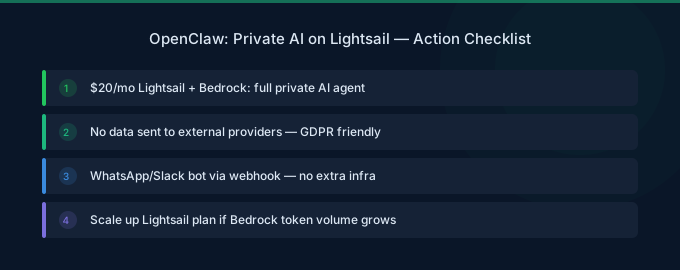
For most personal and small-business use, you'll stay under $25/month. That's ChatGPT Plus pricing — except you own the infrastructure and your data stays private.
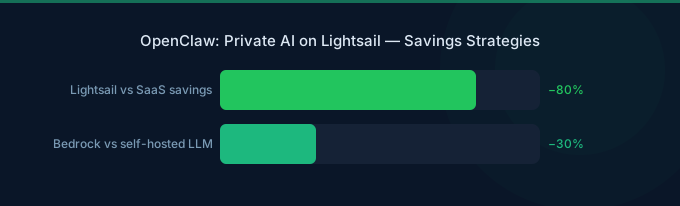
The real savings: At Wring, we've seen customers reduce their overall AI tooling spend by 30-40% by consolidating multiple AI subscriptions (ChatGPT, Claude, Copilot) into a single self-hosted agent. The cost per interaction drops dramatically when you're paying per token instead of per seat.
Related Guides
- AWS Lightsail Pricing Guide
- AWS Bedrock LLM Models Guide
- AWS Credits for Startups
- AWS Bedrock Pricing Guide
Frequently Asked Questions
Is OpenClaw free?
OpenClaw itself is open-source and free. You pay for the infrastructure: a Lightsail instance starting at $20/month for the recommended 4GB plan, plus Amazon Bedrock token costs based on your usage. Light usage with Nova Micro adds less than $1/month in Bedrock fees. There's no software license fee.
Can I use OpenClaw without Amazon Bedrock?
Bedrock is the default and recommended model provider, but OpenClaw is open-source. You could theoretically connect it to other model providers or run local models if your Lightsail instance has enough resources. However, the pre-configured Bedrock integration is what makes the setup take 10 minutes instead of 10 hours.
Is my data private with OpenClaw?
Your data stays within your AWS account. OpenClaw runs on a Lightsail instance you own, and Bedrock processes your requests within AWS's infrastructure. AWS does not use your Bedrock inputs/outputs to train its models. For additional privacy, you can restrict your instance's IAM role and network access using Lightsail's built-in firewall.
Can I run OpenClaw in any AWS region?
OpenClaw on Lightsail is available in all AWS commercial regions where Lightsail operates. However, make sure the Bedrock models you want to use are available in your chosen region. Not all models are available in every region — check the Bedrock model availability page before selecting your region.
How does OpenClaw compare to ChatGPT Plus?
ChatGPT Plus costs $20/month and gives you access to GPT-4o with usage limits. OpenClaw costs roughly the same ($20-22/month with light usage) but gives you full ownership, privacy, model choice (Claude, Llama, Nova, Mistral), messaging app integration, and autonomous agent capabilities. The trade-off: ChatGPT has a more polished interface and requires zero setup.
Get Started in 10 Minutes
OpenClaw on Lightsail is the fastest path to running a private AI agent. No GPU, no Docker, no DevOps. Just a Lightsail blueprint, a Bedrock connection, and your messaging app of choice.
Here's your quickest path:
- Create a 4GB Lightsail instance with the OpenClaw blueprint ($20/month)
- Pair your browser and enable Bedrock with Nova Micro
- Connect your most-used messaging app
- Start sending tasks to your agent