The three prices AWS charges for the same compute
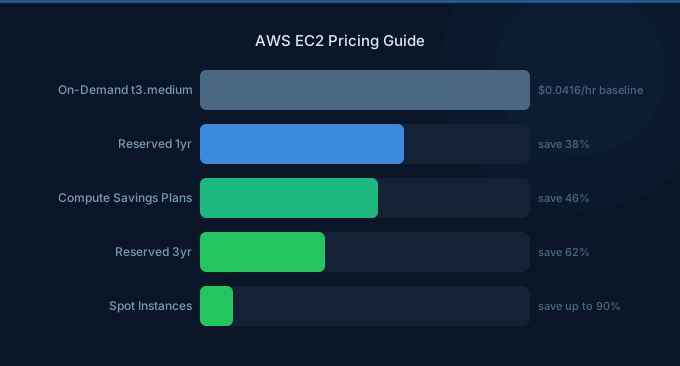
Every EC2 instance, and most other capacity on AWS, can be bought at three prices. On-demand is the list price: metered per second on most operating systems (with a one-minute minimum), no commitment, and the rate every discount is measured against. Commitment discounts, sold as Reserved Instances and Savings Plans, lower the rate in exchange for a promise to pay for a level of usage for one or three years. Spot sells AWS’s spare capacity at a floating price up to 90% below on-demand, with the condition that AWS can take it back at two minutes’ notice.
Above these sits a fourth layer for large accounts: enterprise agreements (the Enterprise Discount Program, or private pricing) that take a percentage off the whole bill in exchange for a multi-year annual spend commitment. AWS does not publish a floor; in practice they start at seven-figure annual spend, and they stack with everything below.
The rule that makes commitments different from every other discount: you pay the committed amount whether you use it or not. An unused reservation is not a lost discount; it is a cost. Everything else in this guide follows from that.
Reserved Instances
A Reserved Instance is not an instance. It is a billing discount that AWS applies to any running instance matching the reservation’s attributes: instance family and size, region or Availability Zone, operating system and tenancy. Launch nothing and the reservation still bills; launch a matching instance and its hourly rate drops to the reserved rate. Reservations exist for EC2, RDS, ElastiCache, OpenSearch, Redshift and DynamoDB (as reserved capacity), each with its own rules, but the mechanics are the same everywhere.
Standard and Convertible
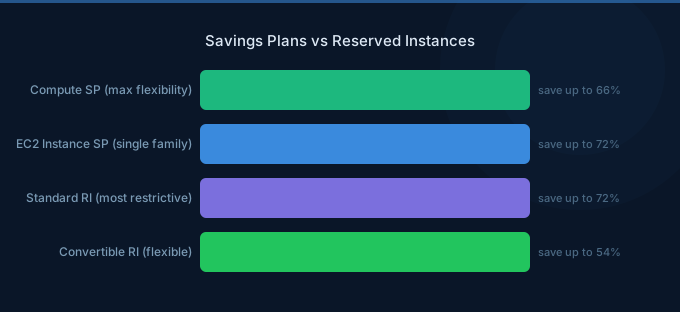
Standard RIs carry the largest discount: AWS’s headline figure is up to 72% for a three-year, all-upfront reservation against on-demand. The attributes are fixed for the term, with one useful exception: a regional Linux Standard RI is size-flexible within its family, so a reservation for one c7a.2xlarge can cover two c7a.xlarge, using AWS’s normalization factors. If you no longer need a Standard RI you can list it for sale on the Reserved Instance Marketplace, subject to AWS’s conditions, which is the only exit an RI has.
Convertible RIs can be exchanged during the term for another Convertible RI of equal or greater value, with a different family, operating system or tenancy. The price of that flexibility is a smaller discount (AWS quotes up to 66%), and Convertible RIs cannot be sold on the Marketplace. In practice, a company that wants this kind of flexibility is usually better served by a Compute Savings Plan, which delivers it without an exchange process.
Payment options and scope
All three payment options (all upfront, partial upfront, no upfront) commit you to the full term; they only change when the money leaves. All upfront gets the deepest discount, no upfront the shallowest, and the gap between them is a few percentage points, which matters far less than the term does. Scope is the other decision: a regional RI applies anywhere in the region and is size-flexible; a zonal RI is pinned to one Availability Zone, is not size-flexible, and in return reserves capacity there, which is a separate thing from a discount and rarely what a cost decision needs.
RDS and the other reserved services
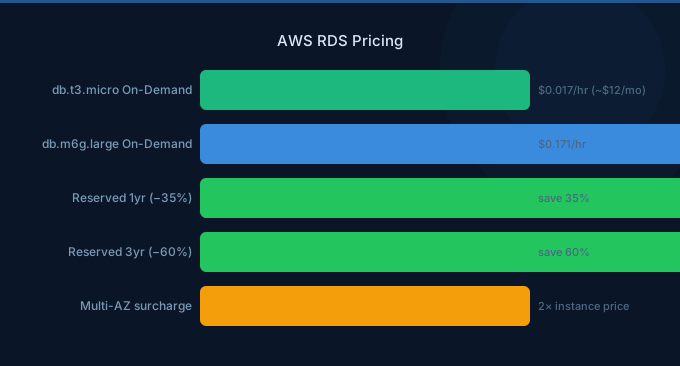
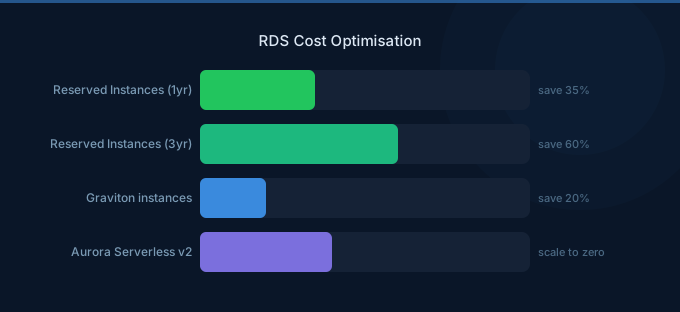
RDS reservations are bought for a database engine, an instance class and a deployment option (Single-AZ or Multi-AZ) for one or three years, and are size-flexible within a family for most engines; there is no Convertible option. Reserved pricing does not extend to serverless capacity such as Aurora Serverless v2, so a database that might move to serverless during the term is a poor candidate. Our RDS pricing guide and RDS cost optimization articles have the numbers; ElastiCache, OpenSearch, Redshift and DynamoDB reserved capacity each follow the same buy-it-and-use-it logic on their own pricing pages.
Savings Plans
A Savings Plan is a commitment to an hourly spend, in dollars, for one or three years. AWS bills eligible usage at the discounted Savings Plan rate up to that hourly commitment and at on-demand beyond it. There are three kinds:
- Compute Savings Plans apply to any EC2 instance regardless of family, size, operating system, tenancy or region, and to Fargate and Lambda. AWS’s headline discount is up to 66%.
- EC2 Instance Savings Plans apply to one instance family in one region, flexible across size, operating system, tenancy and Availability Zone. Up to 72%, the same ceiling as a Standard RI, because they carry the same constraint.
- SageMaker Savings Plans apply to SageMaker ML instance usage, up to 64%.
Two details catch people. First, the commitment is expressed at the discounted rate: a $10-per-hour Compute Savings Plan on usage discounted by 40% covers about $16.67 of on-demand usage per hour, so sizing the commitment off your on-demand spend overcommits by exactly the discount. AWS’s own recommendations in Cost Explorer already account for this. Second, the order of application: if you hold both, Reserved Instances are applied to matching usage first, then Savings Plans, which AWS applies to the usage carrying the highest discount percentage first. A plan is shared across all accounts in the organization unless sharing has been turned off.
Savings Plans have no marketplace. You can return one only within a few days of purchase and only for smaller plans, under conditions AWS sets; otherwise the term is the term. That is the trade-off against a Standard RI: broader coverage, no exit. Our comparison of Savings Plans and Reserved Instances goes through the decision case by case.
Spot
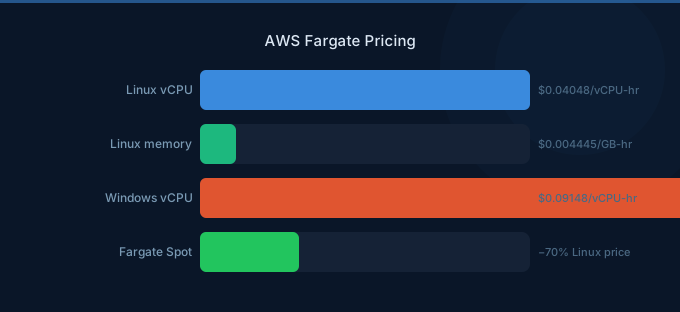
Spot Instances are the same instances at a price set by spare capacity in each pool, up to 90% below on-demand. AWS reclaims them with a two-minute warning when it needs the capacity back, so Spot suits anything that can lose a node without losing work: stateless web tiers behind a load balancer, batch and CI jobs, data processing, and model training with checkpointing (SageMaker’s managed Spot training and Fargate Spot package the same idea). Spot usage is not covered by Reserved Instances or Savings Plans and does not count toward them, which is why the three prices are combined rather than chosen between: the steady baseline on commitments, the interruptible work on Spot, the rest on-demand. The EC2 pricing guide and GPU instance pricing articles carry current Spot figures.
| Option | Term | What it covers | AWS’s headline discount | Way out |
|---|---|---|---|---|
| On-demand | None | Anything | 0% | Stop the instance |
| Standard Reserved Instance | 1 or 3 years | One configuration; size-flexible within a family (regional, Linux) | Up to 72% | Sell on the RI Marketplace |
| Convertible Reserved Instance | 1 or 3 years | Exchangeable for another Convertible RI of equal or greater value | Up to 66% | Exchange only |
| EC2 Instance Savings Plan | 1 or 3 years | One family in one region; any size, OS or tenancy | Up to 72% | None |
| Compute Savings Plan | 1 or 3 years | Any EC2 instance, Fargate and Lambda, in any region | Up to 66% | None |
| Spot | None | Spare capacity, reclaimable at two minutes’ notice | Up to 90% | Reclaimed by AWS |
| 30-day commitment (Wring) | 30 days, renewed | Standard RIs and Savings Plans in your account, re-sized each cycle | 28% vs 55% at 3 years in the example below | 5-day exit SLA |
Coverage, utilization and break-even
Two percentages tell you whether a commitment is working. Utilization is the share of what you committed to that was actually used: a $10-an-hour plan running at 80% utilization is $2 an hour paid for nothing, about $1,460 a month. Coverage is the share of your eligible usage that a commitment applied to: 40% coverage means 60% of a steady workload is still billed at list price. Both are in Cost Explorer’s Reserved Instance and Savings Plans reports, alongside AWS’s purchase recommendations, and AWS Budgets can alert you when either drops below a threshold. If nobody looks at these monthly, nobody knows.
Break-even is the third number, and the one that decides whether a term hurts. A commitment only beats on-demand if the usage outlasts the point where the total committed payments equal what on-demand would have cost. Using the prices from our 30-day RI/SP page:
- A
c7a.32xlargeat about $5,472 a month on-demand costs about $2,462 a month on a three-year commitment, a 55% discount. Over the term that is $88,632, which equals 16.2 months of on-demand. Retire or shrink that workload before month 17 and the “55% discount” cost more than paying list price. - An RDS
db.m8g.8xlargeat about $2,172 a month costs about $1,456 a month on a one-year commitment, a 33% discount. The year totals $17,472, or 8.0 months of on-demand. Turn the database off before month nine and you lost money.
When one- and three-year terms hurt
Usage that grows is safe: the uncovered part simply bills at on-demand until you buy more. Usage that shrinks or changes shape is where terms go wrong.
- Usage drift. Products get retired, customers churn, a team ships the optimization that halves the fleet. A company that rightsizes six months into a three-year EC2 Instance Savings Plan has locked in the waste it just removed.
- Architecture changes. A move from Intel to Graviton takes you from
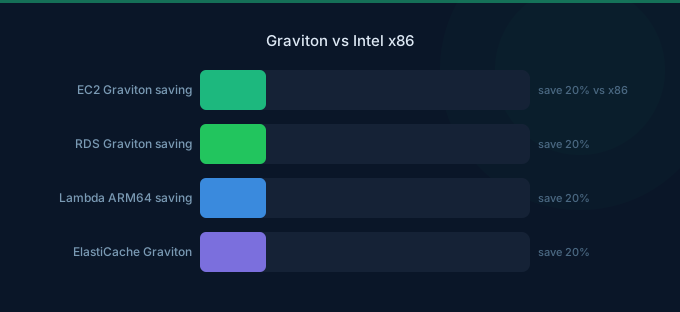
c7atoc7g, which a family-locked RI or EC2 Instance Savings Plan does not follow (only a Compute Savings Plan does). Containers moving to Fargate or Lambda, a database moving to serverless, a region move for latency or data residency: each strands a reservation. Our Graviton vs Intel comparison shows why that migration is worth making, which is exactly why committing to the old family for three years is not. - Company events. An acquisition that consolidates two AWS estates, a pivot, a large customer leaving. None of them cancel a commitment.
- Cash. All-upfront payments buy a few extra points of discount with cash that a growing company usually has better uses for. Between a three-year all-upfront and a three-year no-upfront, the term is the risk; the payment option is the smaller decision.
The asymmetry is what matters. Going from one year to three adds a modest amount of discount; it also triples the period in which you can be wrong. For most companies below enterprise scale, that trade is bad for everything except the workloads they are genuinely certain about: the core database, the always-on API tier, the queue workers that have run unchanged for two years.
The 30-day alternative
Wring offers a middle path that did not exist for most companies: standard AWS Reserved Instances and Savings Plans, purchased in your own AWS account, on a 30-day horizon. Each cycle, the commitment is sized to what you are actually running; if usage drops next month, the commitment drops with it at the start of the next 30-day cycle. You see every commitment, with its break-even, before it is placed. If you need to get out, the commitment is removed under a five-day exit SLA; the removal is insured and the exit route is the AWS Marketplace. Existing Savings Plans keep working exactly as they do; the 30-day commitments cover what is left. The only thing that changes on your side is that your AWS bill comes from Wring, which is how AWS pays for the service and why it is free. The details are on the 30-Day RI/SP page.
The trade-off is the discount. A 30-day commitment cannot be as deep as a three-year lock-in, because the risk you are no longer carrying has to go somewhere. In the two examples on our product page:
| Instance | On-demand | 30-day commitment | Long-term commitment | Break-even of the long term |
|---|---|---|---|---|
| EC2 c7a.32xlarge | ≈ $5,472 / month | ≈ $3,967 / month (−28%) | ≈ $2,462 / month (−55%, 3-year) | 16.2 months of on-demand |
| RDS db.m8g.8xlarge | ≈ $2,172 / month | ≈ $1,814 / month (−16%) | ≈ $1,456 / month (−33%, 1-year) | 8.0 months of on-demand |
Read the table as a decision rule. If you are certain the c7a.32xlarge runs unchanged for three years, the three-year commitment is better by about $1,500 a month, and you should take it. If there is a real chance the workload shrinks, moves to Graviton or is re-architected within 17 months, the 30-day rate beats both on-demand and a stranded commitment. Most fleets contain both kinds of workload, which is why the usual answer is a blend: long terms for the fixed core, 30-day commitments for the rest, Spot for anything interruptible.
Common mistakes
Buying for the wrong attributes
A Reserved Instance matches attributes exactly. A zonal RI in the wrong Availability Zone, a Windows reservation for a Linux fleet, a dedicated-tenancy reservation for shared instances, or a c5 reservation for a fleet that moved to c6i last quarter: each one bills every hour and discounts nothing. Check the running fleet’s attributes in Cost Explorer before buying, and prefer regional scope unless you specifically need reserved capacity.
Committing to the peak instead of the floor
Commit to the lowest hourly usage you are confident of for the whole term, not the average and never the peak. Growth above the floor goes on-demand until the next purchase; that is fine. Commitment above the floor is paid for whether or not the usage arrives.
Committing before rightsizing
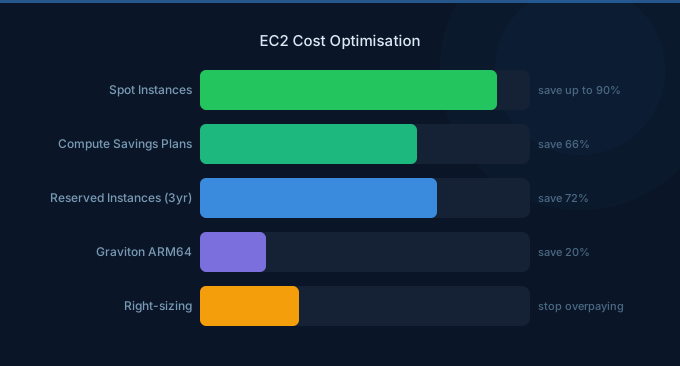
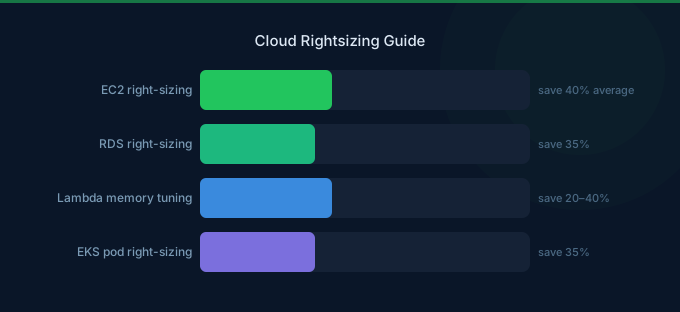
Rightsize first, then commit. Compute Optimizer and the utilization data in CloudWatch will tell you which instances are oversized; buying a reservation for an oversized instance locks in the oversizing for the term. Our cloud rightsizing guide is the place to start, and EC2 cost optimization lists the rest.
Not watching utilization, or expiry
Utilization below 100% is money out. Set a budget alert on utilization and coverage, review the report monthly, and turn on the expiry notifications in the billing preferences: a reservation that expires quietly puts the whole workload back at on-demand, and the first sign is usually a bill that jumped.
Sizing a Savings Plan in on-demand dollars
The commitment is at the discounted rate. Committing your current on-demand hourly spend to a plan with a 40% discount overcommits by that 40%, and the excess is paid every hour of the term. Use the recommendation in Cost Explorer, which already converts.
Sharing turned off, or the wrong account
Discount sharing across an organization is on by default, but it can be disabled per account, and a commitment bought in an account whose sharing is off covers that account alone. Check the setting in the management account before buying anywhere other than the account that runs the workload.
Paying for flexibility you never use
Convertible RIs cost more than Standard RIs for the right to exchange. If nobody ever exchanges them, you paid for nothing; and if flexibility is what you want, a Compute Savings Plan provides it without a process.