RDS is typically the second-largest AWS cost after EC2. The optimization challenge: databases are harder to rightsize than compute because downsizing risks performance degradation, and production databases feel risky to change. This leads to persistent over-provisioning — the average RDS instance runs at 20-40% utilization.
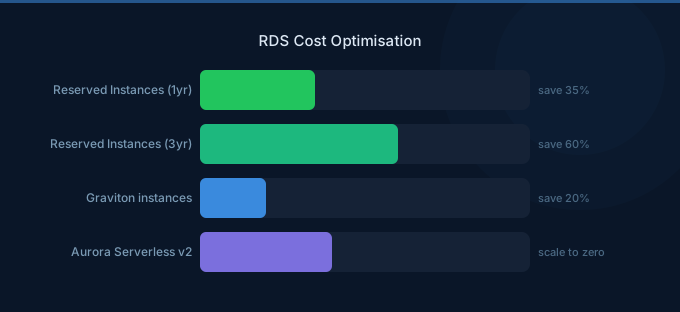
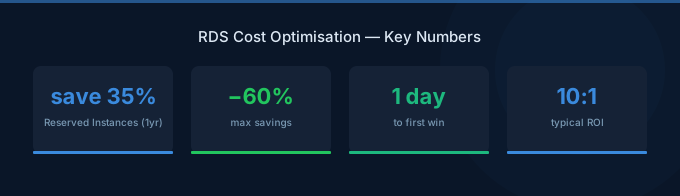
The saving opportunities are substantial. Graviton instances save 20%, Reserved Instances save 30-60%, and switching dev databases to Aurora Serverless v2 can save 50-70%. Combined, these strategies reduce database costs 30-60%.
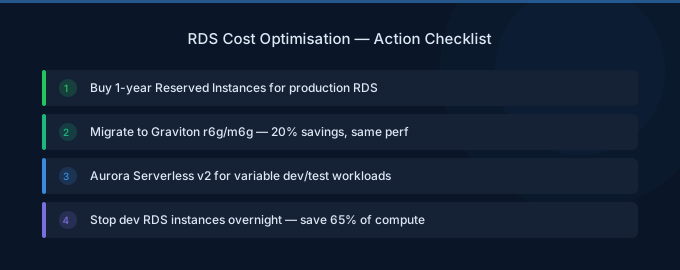
TL;DR: RDS optimization priorities: (1) Graviton instances for 20% savings (db.r7g over db.r7i). (2) Reserved Instances for production databases running 24/7 (30-60% off). (3) Aurora Serverless v2 for dev/test and variable workloads (50-70% off). (4) Rightsize based on CloudWatch metrics (CPU, memory, connections). (5) Stop idle dev/staging databases. (6) Optimize storage — use gp3 over gp2, set appropriate IOPS.
RDS Cost Anatomy
| Component | Typical % of RDS Bill | Optimization Lever |
|---|---|---|
| Instance compute | 55-70% | Rightsizing, Graviton, RIs |
| Storage (gp3/io2) | 10-20% | Volume type, right-size capacity |
| I/O charges (Aurora Standard) | 5-20% | I/O-Optimized mode |
| Backup storage | 3-5% | Retention policy |
| Data transfer | 2-5% | Read replicas in same AZ |
| Multi-AZ (standby) | 0-30% | Only for production |
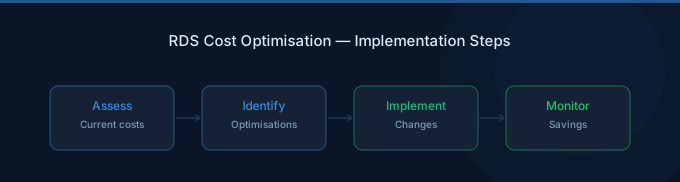
Strategy 1: Graviton Instances (20% Savings)
Every RDS instance family has a Graviton equivalent. 20% cheaper with comparable or better performance.
| Intel Instance | Graviton Equivalent | Monthly Savings |
|---|---|---|
| db.r7i.large ($227/mo) | db.r7g.large ($190/mo) | $37 |
| db.r7i.xlarge ($454/mo) | db.r7g.xlarge ($380/mo) | $74 |
| db.r7i.2xlarge ($908/mo) | db.r7g.2xlarge ($759/mo) | $149 |
How: Modify the RDS instance, change to Graviton instance class. Apply during maintenance window. Minimal risk — same engine, same data, different CPU architecture.
Strategy 2: Reserved Instances for Production (30-60% Savings)
Production databases that run 24/7 should be reserved. RDS Reserved Instances provide significant savings:
| Term | Payment | Savings vs On-Demand |
|---|---|---|
| 1-year No Upfront | Monthly payments | ~30% |
| 1-year All Upfront | Lump sum | ~40% |
| 3-year All Upfront | Lump sum | ~60% |
Start conservative: 1-year No Upfront for production databases that have run for 3+ months and will continue. The 30% savings with no upfront commitment and easy exit make this a low-risk optimization.
When NOT to reserve: Databases that might be decommissioned, migrated to Aurora, or significantly resized in the next year.
Strategy 3: Aurora Serverless v2 for Variable Workloads (50-70% Savings)
Dev/staging databases and applications with variable query patterns waste money on provisioned instances. Aurora Serverless v2 scales compute to match demand.
| Scenario | Provisioned (db.r7g.large) | Serverless v2 (avg usage) | Savings |
|---|---|---|---|
| Dev database (10% utilization) | $190/month | $44/month | 77% |
| Staging (25% utilization) | $190/month | $88/month | 54% |
| Variable production (40%) | $190/month | $135/month | 29% |
Rule of thumb: If database utilization averages under 40%, Serverless v2 is cheaper.
Strategy 4: Rightsize Based on Metrics
Check CloudWatch for these RDS metrics over 14+ days:
| Metric | Over-Provisioned Signal | Action |
|---|---|---|
| CPUUtilization | Under 30% average | Downsize one tier |
| FreeableMemory | Over 60% of total | Consider smaller instance |
| DatabaseConnections | Under 20% of max | May not need current size |
| ReadIOPS/WriteIOPS | Consistently low | May not need io2 storage |
Rightsize approach: Downsize one tier at a time. Monitor for 2 weeks. If performance is acceptable, consider downsizing again.
Strategy 5: Stop Idle Databases
Dev and staging databases running 24/7 with zero connections during nights and weekends waste 65% of their compute cost.
Options:
- Stop manually — RDS allows stopping instances for up to 7 days (auto-restarts after 7 days)
- Aurora Serverless v2 — Scales to minimum 0.5 ACU ($44/month) during idle periods
- Snapshot and restore — For databases needed only occasionally, snapshot, delete, and restore when needed
Strategy 6: Optimize Storage
Switch gp2 to gp3
Every gp2 volume should be gp3. No downtime required. 20% cheaper with better baseline performance (3,000 IOPS and 125 MiB/s included).
Right-Size Storage Allocation
RDS storage auto-scaling can grow volumes but never shrinks them. Periodically review:
- Is allocated storage significantly more than used storage?
- For Aurora: storage is billed per GB used (no over-allocation waste)
Choose the Right Storage Type
| Storage Type | Cost | Best For |
|---|---|---|
| gp3 | $0.08/GB/mo + IOPS above 3K | Most workloads |
| io2 | $0.125/GB/mo + $0.065/IOPS | High-performance OLTP |
| Aurora Standard | $0.10/GB/mo + I/O charges | Low-medium I/O workloads |
| Aurora I/O-Optimized | $0.225/GB/mo, no I/O charges | High-I/O workloads |
Strategy 7: Optimize Multi-AZ and Read Replicas
Multi-AZ: Doubles compute cost for a standby replica. Required for production (high availability). Not needed for dev/staging — disable it.
Read replicas: Can offload reads from the primary, but each replica costs the same as an additional instance. Only add read replicas when the primary can't handle read traffic, not as a default.
Right-size replicas independently: A read replica doesn't need to match the primary instance size. If reads are lighter, use a smaller instance.
Aurora-Specific Optimizations
I/O-Optimized vs Standard
Aurora charges $0.20/million I/O operations on Standard. For read-heavy workloads, this adds up fast:
| Monthly I/O Volume | I/O Cost (Standard) | Switch to I/O-Optimized? |
|---|---|---|
| 100M | $20 | No (under 25% of compute) |
| 1B | $200 | Maybe (check vs compute cost) |
| 5B | $1,000 | Yes (exceeds compute cost) |
Rule: If I/O charges exceed 25% of your compute charges, switch to I/O-Optimized. You pay 30% more for compute and 125% more for storage, but I/O is free.
Aurora Global Database
Charges for cross-region replication. Only use for multi-region applications that require sub-second read latency globally. Not needed for disaster recovery alone — standard Aurora backups to S3 are sufficient for most DR requirements.
Related Guides
- AWS RDS Pricing: Instance Costs and Savings
- AWS Aurora Pricing Guide
- Savings Plans vs Reserved Instances: Which Saves More?
- Cloud Rightsizing Guide
Frequently Asked Questions
How much can I save on RDS?
Most organizations save 30-60% through systematic optimization: 20% from Graviton migration, 30-60% from Reserved Instances on production, 50-70% from Aurora Serverless v2 on dev/test, and 10-20% from rightsizing. The combined effect depends on your current waste level.
Should I use RDS or Aurora?
Aurora costs about 20% more for compute but includes built-in high availability, faster failover, and distributed storage. For production databases requiring high availability, Aurora's total cost is often comparable to RDS Multi-AZ. For simple dev/test databases, standard RDS is cheaper.
When should I buy RDS Reserved Instances?
When a production database has run for 3+ months and you expect it to continue for at least 12 more months. Start with 1-year No Upfront for flexibility. Apply to your largest databases first for maximum savings.
How do I handle RDS for dev/test?
Three options ranked by cost: (1) Aurora Serverless v2 — scales to near-zero during idle time. (2) Smallest RDS instance stopped outside business hours. (3) RDS on smallest instance running 24/7. Option 1 is usually cheapest for databases used intermittently.
Optimize Your Database Costs
Database optimization is high-impact because databases run 24/7 and represent 15-25% of most AWS bills:
- Graviton first — 20% savings, minimal risk, immediate impact
- Reserve production — 30-60% off your largest, most stable databases
- Serverless for dev — Stop paying full price for idle databases
- Rightsize actively — Check metrics quarterly, downsize when over-provisioned
- Optimize Aurora I/O — Switch to I/O-Optimized if I/O charges exceed 25% of compute