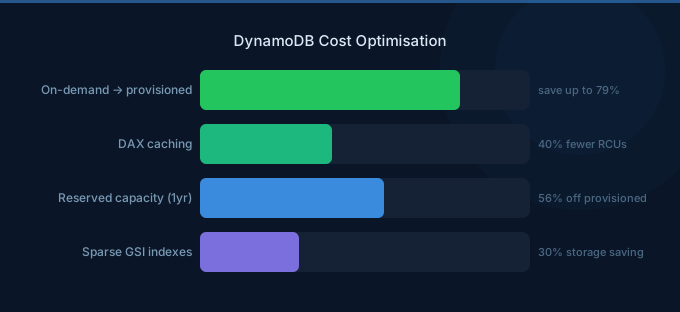
DynamoDB costs catch many teams off-guard. The per-request pricing seems cheap until you're processing billions of reads and writes monthly. The difference between a well-optimized and a naive DynamoDB setup can be 5-10x in cost. Capacity mode choice, item size, read consistency, and secondary indexes are the four biggest cost levers.
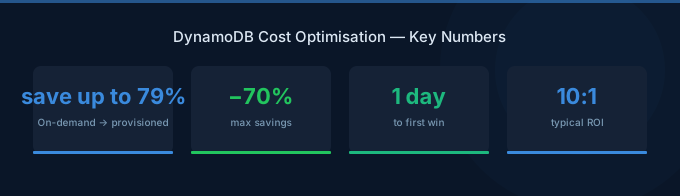
TL;DR: The three biggest DynamoDB savings: (1) Switch steady-state tables to provisioned capacity with auto-scaling — 5-7x cheaper than on-demand for predictable workloads. (2) Use eventually consistent reads (default) — they cost half of strongly consistent reads. (3) Minimize item size and avoid scanning — DynamoDB charges per RCU/WCU based on item size, so smaller items and precise queries directly reduce costs.
Capacity Mode: On-Demand vs Provisioned
This single decision has the largest cost impact.
On-Demand Pricing
| Operation | Cost |
|---|---|
| Write request | $1.25 per million WRUs |
| Read request | $0.25 per million RRUs |
Provisioned Pricing
| Operation | Cost |
|---|---|
| Write capacity unit (WCU) | $0.00065 per hour ($0.4745/month) |
| Read capacity unit (RCU) | $0.00013 per hour ($0.0949/month) |
Cost Comparison
| Workload (per second) | On-Demand/month | Provisioned/month | Savings |
|---|---|---|---|
| 100 writes + 500 reads | $360 | $75 | 79% |
| 1,000 writes + 5,000 reads | $3,600 | $750 | 79% |
| 10,000 writes + 50,000 reads | $36,000 | $7,500 | 79% |
Rule: If your traffic is predictable within 2-3x range, provisioned with auto-scaling is dramatically cheaper. On-demand is best for unpredictable, spiky workloads or new tables where patterns aren't established.
Strategy 1: Right-Size Capacity with Auto-Scaling
Set provisioned capacity with auto-scaling:
- Target utilization: 70%
- Minimum capacity: your baseline traffic
- Maximum capacity: 2-3x baseline for peaks
Auto-scaling adjusts within minutes. The cost savings vs on-demand are 70-80% while still handling traffic spikes.
Strategy 2: Use Eventually Consistent Reads
| Read Type | RCU per 4 KB | Cost Factor |
|---|---|---|
| Eventually consistent | 0.5 RCU | 1x |
| Strongly consistent | 1.0 RCU | 2x |
| Transactional | 2.0 RCU | 4x |
Eventually consistent reads cost half of strongly consistent. For most use cases (dashboards, product listings, user profiles), eventual consistency is acceptable — data is typically consistent within milliseconds.
Strategy 3: Minimize Item Size
DynamoDB charges per 4 KB (reads) and 1 KB (writes) chunks. A 4.1 KB item costs 2 RCUs to read, same as an 8 KB item.
Optimization tactics:
- Use short attribute names (
pkinstead ofpartitionKey) - Remove null/empty attributes (DynamoDB charges for stored nulls)
- Compress large string attributes with gzip
- Store large objects in S3 and reference them in DynamoDB
Strategy 4: Use Reserved Capacity
| Term | Savings vs Provisioned |
|---|---|
| 1-year | ~25% |
| 3-year | ~50% |
Reserved capacity applies to provisioned WCUs/RCUs. Combined with provisioned mode (79% savings vs on-demand) and reserved capacity (additional 50%), total savings reach 89% vs on-demand.
Strategy 5: Optimize Global Secondary Indexes
Each GSI is essentially a separate table with its own capacity charges. Projected attributes determine GSI storage costs.
Cost reducers:
- Project only needed attributes (not ALL)
- Delete unused GSIs — each consumes WCUs for every write to the base table
- Use sparse indexes (only items with the indexed attribute get written to the GSI)
Strategy 6: Enable TTL for Expiring Data
DynamoDB TTL deletes expired items for free — no write capacity consumed. For session data, cache entries, temporary tokens, or event logs with retention periods, TTL eliminates manual cleanup jobs and their associated WCU costs.
Strategy 7: Use DAX for Read-Heavy Workloads
DynamoDB Accelerator (DAX) caches reads in memory:
| DAX Node | Cost/hr | Monthly |
|---|---|---|
| dax.t3.small | $0.04 | $29 |
| dax.r5.large | $0.269 | $196 |
A dax.t3.small node at $29/month can replace millions of RCUs worth of reads. For read-heavy workloads with repeated access patterns, DAX pays for itself many times over.
Strategy 8: Use Batch Operations
BatchWriteItem and BatchGetItem process up to 25 items per request. While DynamoDB still charges per item, batching reduces overhead, latency, and retry logic — indirectly reducing costs from over-provisioning to handle individual request latency.
Strategy 9: Avoid Table Scans
A scan reads every item in the table, consuming RCUs proportional to the total table size. A 10 GB table scan consumes 2,560 RCUs regardless of how many results match your filter.
Alternatives:
- Design proper partition keys and sort keys for query access
- Use GSIs for additional access patterns
- Use
PartiQLSELECT with WHERE clauses that map to key conditions
Strategy 10: Monitor with CloudWatch
Track these metrics in AWS Cost Management to identify waste:
ConsumedReadCapacityUnitsvsProvisionedReadCapacityUnits— if consumed is consistently under 30% of provisioned, downsizeThrottledRequests— if zero, you may be over-provisionedReturnedItemCountvsScannedCount— a large gap indicates inefficient queries
Related Guides
- AWS DynamoDB Pricing: On-Demand vs Provisioned
- Cloud Rightsizing Guide
- Cloud Tagging Strategy Guide
- AWS RDS Cost Optimization Guide
FAQ
When should I use on-demand vs provisioned?
Use on-demand for new tables, development environments, and highly unpredictable workloads. Switch to provisioned with auto-scaling once you have 2+ weeks of traffic data showing a consistent pattern. Provisioned saves 70-80%.
Can I switch between on-demand and provisioned?
Yes, once every 24 hours. You can start with on-demand, observe traffic patterns, then switch to provisioned. This is a zero-downtime operation.
How do I estimate DynamoDB costs for a new application?
Estimate reads per second, writes per second, and average item size. Use provisioned pricing: monthly cost = (writes/s x $0.4745) + (reads/s x $0.0949 / 2 for eventual consistency). Add 20% for GSI overhead.