SageMaker is one of the highest-spend AWS services for ML teams, and most of that spend is waste. Inference endpoints running 24/7 at under 10% utilization, training jobs on oversized GPU instances, notebooks left running overnight, and endpoints provisioned for peak traffic that arrives once a day. The platform has more cost optimization levers than almost any other AWS service — you just need to know where to pull.
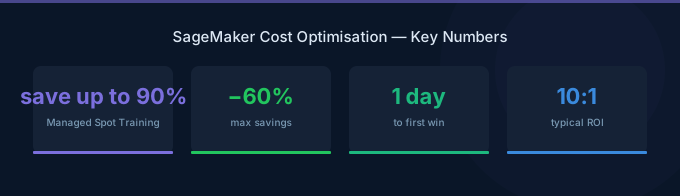
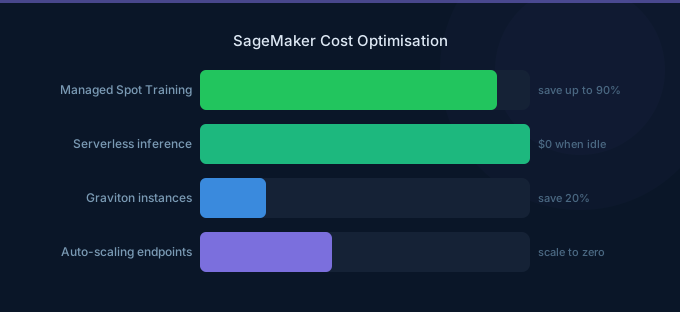
TL;DR: The three biggest SageMaker savings: (1) Use Managed Spot Training for 60-90% off training costs — most training jobs are fault-tolerant and complete with zero interruptions. (2) Switch low-traffic inference endpoints to Serverless Inference or scale to zero with auto-scaling — idle GPU endpoints are the number one waste. (3) Use Graviton (ml.c7g, ml.m7g) instances for CPU-based inference — 20% cheaper with 20% better performance. These three alone save most teams 40-60%.
Where SageMaker Costs Hide
Before optimizing, understand where the money goes. For a typical ML team:
| Component | Typical Share | Common Waste |
|---|---|---|
| Inference endpoints | 50-70% | Idle endpoints, oversized instances |
| Training jobs | 15-25% | Full on-demand pricing, oversized GPUs |
| Notebooks/Studio | 5-15% | Running overnight, weekends |
| Storage (S3, EFS) | 3-5% | Old model artifacts, training data copies |
| Data processing | 2-5% | Unoptimized Spark jobs |
Inference endpoints dominate — a single ml.g5.xlarge endpoint costs $737/month running 24/7. Teams with 5-10 endpoints can spend $3,000-7,000/month on inference alone.
Training Cost Optimization
Strategy 1: Use Managed Spot Training
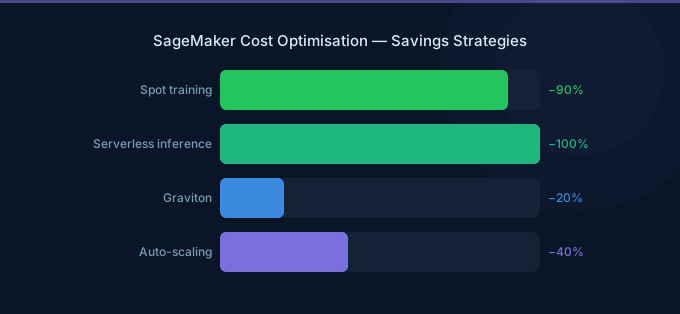
Spot instances provide up to 90% savings for training jobs. SageMaker Managed Spot handles interruptions automatically with checkpointing.
| Instance | On-Demand/hr | Spot/hr | Savings |
|---|---|---|---|
| ml.g5.xlarge (1 GPU) | $1.01 | $0.30 | 70% |
| ml.g5.2xlarge (1 GPU) | $1.52 | $0.46 | 70% |
| ml.g5.12xlarge (4 GPU) | $7.09 | $2.13 | 70% |
| ml.p4d.24xlarge (8 A100) | $32.77 | $9.83 | 70% |
How to enable: Set use_spot_instances=True and max_wait (maximum time including interruptions) in your training job configuration. Set max_wait to 2x your expected training time.
Checkpointing: Enable checkpointing to S3 so training resumes from the last checkpoint after an interruption. Most frameworks (PyTorch, TensorFlow) support this natively.
Real-world results: Most Spot training jobs complete without any interruption. When interruptions occur, checkpointing means you only lose minutes, not hours.
Strategy 2: Right-Size Training Instances
Teams frequently use the largest GPU available "to be safe." But many training jobs are bottlenecked by data loading, not GPU compute.
How to right-size:
- Run a short training job (10 minutes) and monitor GPU utilization via CloudWatch
- If GPU utilization is under 50%, try a smaller instance
- If GPU memory utilization is under 30%, you're overpaying for unused VRAM
| Scenario | Oversized | Right-Sized | Monthly Savings |
|---|---|---|---|
| Fine-tuning a 7B model | ml.p4d.24xlarge ($32.77/hr) | ml.g5.2xlarge ($1.52/hr) | 95% |
| Training a tabular model | ml.g5.xlarge ($1.01/hr) | ml.c7g.2xlarge ($0.39/hr) | 61% |
| Image classification | ml.g5.12xlarge ($7.09/hr) | ml.g5.2xlarge ($1.52/hr) | 79% |
Strategy 3: Use SageMaker Training Compiler
SageMaker Training Compiler optimizes deep learning model training, reducing training time by up to 50% for supported frameworks (PyTorch, TensorFlow with Hugging Face). Less training time = less cost, with no code changes required.
Strategy 4: Optimize Data Loading
Slow data loading leaves GPUs idle. Use these patterns:
| Technique | Impact |
|---|---|
| SageMaker Pipe Mode | Stream data from S3 instead of downloading — eliminates startup delay |
| FSx for Lustre | High-throughput shared filesystem for large datasets |
| ShardedByS3Key | Distribute data across training instances automatically |
| Prefetching | DataLoader workers load next batch while GPU processes current |
Inference Cost Optimization
Strategy 5: Use Serverless Inference for Low-Traffic Models
Serverless Inference scales to zero when idle and automatically handles traffic spikes.
| Component | Cost |
|---|---|
| Compute | Based on memory and processing time |
| Memory | From 1 GB to 6 GB |
| Cold start | 1-2 seconds (first request after idle) |
| Idle cost | $0 |
| Scenario | Real-Time Endpoint | Serverless | Savings |
|---|---|---|---|
| 100 requests/day, ml.c5.large | $63/month (24/7) | ~$5/month | 92% |
| 1K requests/day, ml.m5.xlarge | $139/month (24/7) | ~$20/month | 86% |
Use Serverless when: Traffic is sporadic, latency of 1-2 seconds is acceptable, and you don't need GPU inference.
Strategy 6: Auto-Scale Real-Time Endpoints
Configure auto-scaling to match capacity to demand:
| Metric | Target |
|---|---|
| InvocationsPerInstance | Scale based on requests per instance |
| CPUUtilization | Scale based on CPU load |
| Minimum instances | 0 (scale to zero) or 1 (always-on) |
| Cooldown | 300 seconds (scale in), 60 seconds (scale out) |
Scale to zero: Set minimum instances to 0 for development and internal models. The endpoint scales up on the first request (with cold start latency) and scales down after the cooldown period.
Strategy 7: Use Inference Components (Multi-Model Endpoints)
Host multiple models on a single endpoint instance:
| Approach | 3 Models Separately | 3 Models on 1 Endpoint |
|---|---|---|
| Instances | 3x ml.g5.xlarge | 1x ml.g5.4xlarge |
| Monthly cost | $2,211 | $1,474 |
| Savings | — | 33% |
Inference Components dynamically load models into memory based on traffic, maximizing GPU utilization across models.
Strategy 8: Use Graviton for CPU Inference
For models that don't require GPU (scikit-learn, XGBoost, some ONNX models), Graviton instances are 20% cheaper with 20% better price-performance:
| Instance | On-Demand/hr | Use Case |
|---|---|---|
| ml.c7g.medium (Graviton) | $0.05 | Lightweight models |
| ml.c7g.xlarge (Graviton) | $0.19 | Medium CPU models |
| ml.c6i.xlarge (Intel) | $0.24 | Same workload, 26% more expensive |
Strategy 9: Use Batch Transform for Offline Predictions
For predictions that don't need real-time responses, Batch Transform processes data in S3 and shuts down when done:
| Approach | 1M predictions/day | Monthly Cost |
|---|---|---|
| Real-time endpoint (24/7) | ml.c5.xlarge always on | $126/month |
| Batch Transform (2 hours/day) | ml.c5.xlarge for 2 hrs | $8/month |
Notebook and Studio Optimization
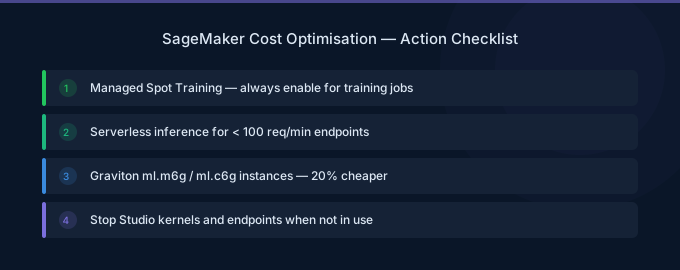
Strategy 10: Auto-Stop Idle Notebooks
SageMaker Studio notebooks and classic notebook instances run until manually stopped. Use lifecycle configurations to auto-stop after idle periods:
| Configuration | Impact |
|---|---|
| Auto-stop after 1 hour idle | Eliminates overnight/weekend costs |
| Typical savings | 60-70% of notebook costs |
A ml.t3.medium notebook running 24/7 costs $31/month. With 8-hour workday auto-stop, it costs $10/month.
Strategy 11: Use the Right Notebook Instance
| Task | Recommended Instance | Cost/hr |
|---|---|---|
| Code editing, small data | ml.t3.medium | $0.042 |
| Data exploration, pandas | ml.m5.xlarge | $0.190 |
| GPU prototyping | ml.g4dn.xlarge | $0.526 |
| Large-scale training dev | Use training jobs instead | — |
Common waste: Developers using ml.g5.xlarge ($1.01/hr) notebooks for writing code and reviewing results, when ml.t3.medium ($0.042/hr) suffices.
Storage and Infrastructure
Strategy 12: Clean Up Model Artifacts
SageMaker stores model artifacts, training outputs, and checkpoints in S3. These accumulate:
| Artifact | Typical Size | Cleanup Strategy |
|---|---|---|
| Training checkpoints | 1-50 GB per job | Delete after final model is selected |
| Model artifacts | 0.5-20 GB per version | Keep only production and rollback versions |
| Processing job outputs | 1-10 GB per job | Delete after validation |
Set S3 lifecycle policies on your SageMaker output bucket:
- Delete training checkpoints after 30 days
- Move old model artifacts to Glacier after 90 days
Cost Monitoring
Track these CloudWatch metrics across all SageMaker components:
| Metric | What to Watch |
|---|---|
| CPUUtilization (endpoints) | Under 20% = over-provisioned |
| GPUUtilization (endpoints) | Under 30% = consider smaller instance |
| InvocationsPerInstance | Near zero = candidate for Serverless |
| ModelLatency | Increasing = may need larger instance |
| OverheadLatency | High = networking issue, not instance size |
Use AWS Cost Explorer filtered to SageMaker with "Usage Type" grouping to see training vs inference vs notebook costs separately.
Related Guides
- AWS SageMaker Pricing: Training, Inference, Studio
- AWS Bedrock vs SageMaker
- GPU Cost Optimization Playbook
- AI Cost Optimization: Reduce LLM and GPU Spend
FAQ
What's the single biggest SageMaker cost savings?
Switching idle inference endpoints to Serverless Inference or scaling to zero. Most teams have 2-5 endpoints running 24/7 that serve fewer than 100 requests per hour — these can be 90%+ cheaper on Serverless.
Is Managed Spot Training reliable?
Yes. In practice, most Spot training jobs complete without interruption. When interruptions occur (approximately 5-10% of jobs), checkpointing means you only lose the time since the last checkpoint (typically minutes). The 70% cost savings far outweigh the occasional restart.
How do I calculate my SageMaker ROI?
Compare the cost of SageMaker infrastructure (training + inference + notebooks) against the business value of your ML models. Then optimize: most teams can cut SageMaker costs 40-60% without affecting model performance, directly improving ROI.